
The best free SEO tools for 2026 can help you grow your website without paying for expensive software.
You want your site on page one of Google. But paid tools like Ahrefs and Semrush cost more than $100 a month. That’s a hard sell when you’re just starting out.
If you are a beginner, blogger, small business owner, or content creator, finding the right SEO tool can feel confusing.
Some tools are great for keyword research, while others help you check Google Search performance, fix technical SEO problems, or improve your content optimization.
Free SEO tools got a real upgrade in 2026. Some now pull live data straight from Google. Others turn one keyword into hundreds of content ideas in seconds.
This guide covers the best free keyword research tools you can use right now. You’ll see what each tool does well, where it falls short, and which one fits your goal.
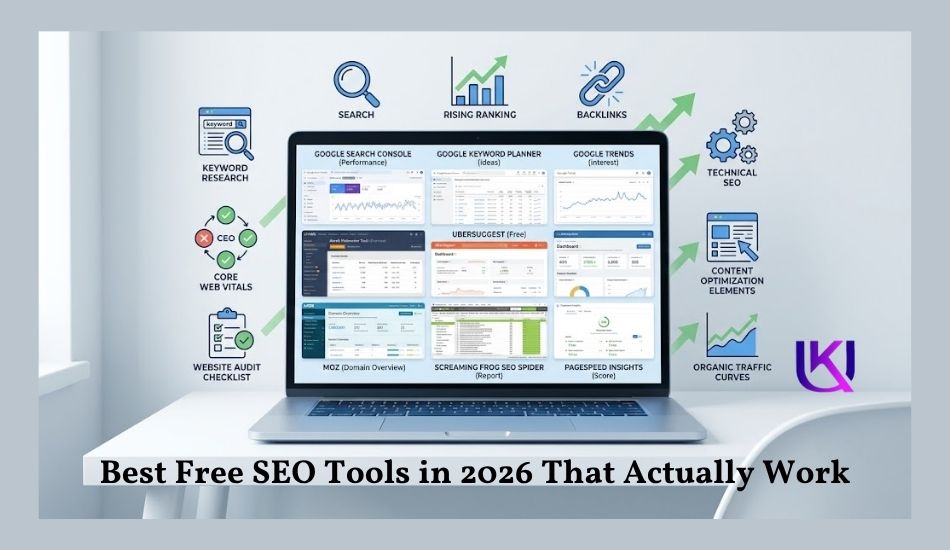
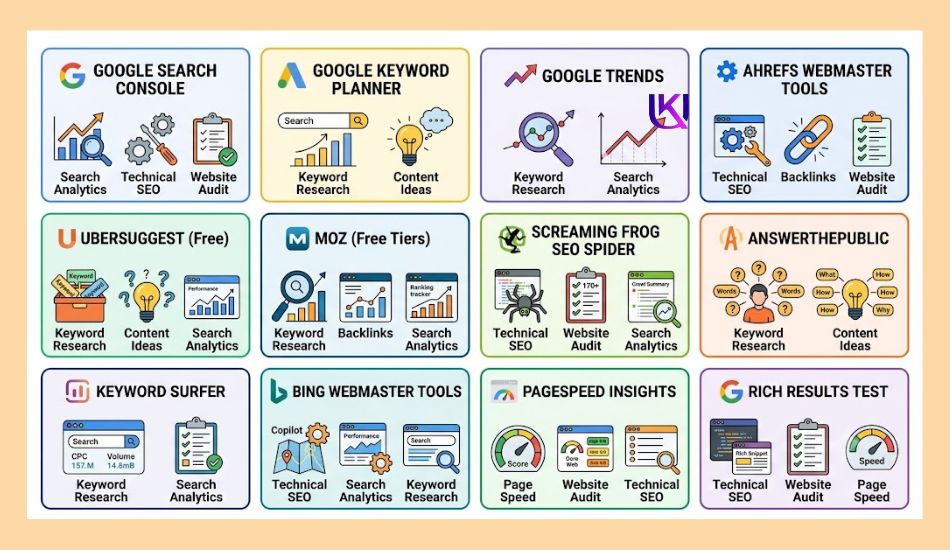
Trusted tools like Google Search Console(GSC), Google Keyword Planner, Google Trends, Ahrefs Webmaster Tools, Ubersuggest, Moz, and Screaming Frog SEO Spider each solve different SEO tasks.
However, you will compare the best free SEO tools, learn what each one does well, understand its limits, and discover which tools match your goals so you can improve your Google rankings and bring more organic traffic to your website.
| Quick Tip: Don’t try all these tools at once. Pick two. Use them for a month. Then decide what stays in your toolkit. |
Why You Need SEO Tools Before You Start Optimizing
You may have great ideas and write helpful content, but that does not mean people will find your website. Before you change pages or write new blog posts, you need to know what your audience is searching for. That is where SEO tools help.
(Search Engine Optimization) SEO tools show you real data instead of guesses. They help you find the right keywords, understand search intent, check your Google Search performance, and spot problems that may stop your pages from ranking. When you use this information first, you can make smarter decisions and save time.
If you run a blog, a small business website, or an online store, free SEO tools give you a clear starting point. You can see what works, what needs to improve, and where the best opportunities are.
1. Best Free SEO Tools 2026: Help You Find the Right Keywords
One of the biggest mistakes beginners make is writing about topics that no one searches for. A good keyword research tool helps you discover words and phrases your audience already uses.
For example, tools like Google Keyword Planner, Google Trends, Ahrefs Free Keyword Generator, and Ubersuggest can help you find:
- Search volume
- Related keywords
- Long-tail keywords
- Question keywords
- Search trends
- Keyword difficulty
Instead of guessing, you can choose keywords that match what people are looking for today. This makes it easier to create content that answers real questions and is more likely to appear in search results.
2. Show What Google Sees
Google is a giant search engine in the online world right now, so it looks at many signals before deciding where a page should rank. Free SEO tools help you understand some of those signals.
For example, Google Search Console can show you:
- Which pages appear in Google Search
- Which keywords bring visitors
- Your average ranking position
- Click-through rate (CTR)
- Indexing issues
- Crawl errors
This data helps you improve pages that already have ranking potential, rather than starting from scratch.
3. Find Technical SEO Problems
Sometimes a page does not rank because of technical issues, not because of poor content.
Free tools such as Screaming Frog SEO Spider, PageSpeed Insights, and Rich Results Test can help you find problems like:
- Broken links
- Slow page speed
- Missing title tags
- Missing meta descriptions
- Mobile usability issues
- Core Web Vitals problems
- Structured data errors
Fixing these issues makes it easier for search engines to crawl, understand, and rank your website.
4. They Help You Create Better Content
Writing more content does not always mean getting more traffic. You need content that matches user intent and answers the questions people ask.
SEO tools help you discover:
- Popular topics
- Related questions
- Topic clusters
- Content gaps
- Competitor ideas
When you understand what your audience wants, you can create content that is more useful, easier to read, and more likely to earn organic traffic.
5. Best Free SEO Tools 2026: They Save Time and Money
Many people think they need expensive SEO software to compete. In reality, several free tools offer enough data to build a strong SEO strategy.
By combining tools like Google Search Console, Google Trends, Google Keyword Planner, Ahrefs Webmaster Tools, and PageSpeed Insights, you can research keywords, monitor website performance, fix technical problems, and improve your content without paying for premium software.
Starting with the right free SEO tools gives you a solid foundation. As your website grows, you can decide if you need advanced paid features, but you do not need them to begin ranking smarter.
Best Free SEO Tools 2026: The Best Free SEO Tools at a Glance
| Tool | Best For | Free Daily Limit | Standout Feature |
| Google Search Console | Real ranking data | Unlimited | Shows keywords you already rank for |
| Google Keyword Planner | New keyword ideas | Unlimited | Search volume ranges straight from Google |
| Google Trends | Spotting trends early | Unlimited | City-level search interest data |
| Keyword Surfer | Fast research in-browser | Unlimited | Volume + CPC inside Google results |
| Moz Keyword Explorer | Beginners | 10 queries/month | One priority score, not three |
| Answer Socrates | Question keywords & FAQs | 3 searches/day | Over 1,000 keywords per topic |
| Wordtracker Scout | Simple, no-clutter research | 12 searches/day | Fast profitability score |
| Serpstat | Competitor keyword research | 10/day (30 signed in) | Keywords + rank tracking together |

1. Google Search Console (GSC): Best Overall Free Tool
Google Search Console is free. It has no daily limit. And GSC is the one tool every website owner should set up first.
It shows you real data from Google. Not guesses. You see the exact words people type before they click your site. You see your average position for each keyword. You see which pages get clicks and which ones don’t.
This tool works best after your site has some traffic. A brand-new site won’t show much data at first. Give it a few weeks.
| Quick Tip: Open the Performance report. Sort by position. Look for keywords sitting between spot 8 and spot 15. Those pages are close to page one. A few small updates can push them higher. |
2. Google Keyword Planner
Keyword Planner comes from Google Ads. But you don’t need to run ads to use it. A free Google account is all you need.
Type in one keyword. You’ll get a list of related terms, plus a search volume range for each one. You’ll also see how competitive each keyword is for ads, which hints at how competitive it is in search too.
The catch: exact search numbers stay hidden unless you spend money on ads. You’ll see ranges like “1K to 10K” instead of a real number. Still, it’s a solid starting point for building your first keyword list.
3. Google Trends
Google Trends shows you the shape of a keyword over time. Is interest going up? Going down? Staying flat? You’ll see a graph, not just a number.
This matters for content planning. Say you write about back-to-school shopping. Trends shows you exactly when interest starts climbing each year. You can publish your article weeks ahead, right when Google starts rewarding fresh content on that topic.
You can also drill down by city or state. That’s useful if you run a local business and want to know where your audience is searching from most.
4. Keyword Surfer (Best Browser Extension)
Keyword Surfer is a free extension for Chrome and Edge. Once installed, it adds search volume and cost-per-click numbers right next to your regular Google search results. No need to open a new tab or tool.
As you type a search, related keyword ideas pop up in the sidebar. It’s fast. It fits right into how you already search for things.
The downside: it only works in Chrome-based browsers, and it won’t show you how a keyword’s volume changed over the past year. Pair it with Google Trends for that.
5. Moz Keyword Explorer (Best for Beginners)
Moz gives you 10 free keyword queries a month. That’s not a lot, but each search goes deep. Type in one seed keyword, and Moz hands back thousands of related suggestions.
What makes Moz stand out is its priority score. Instead of juggling three separate numbers (volume, difficulty, and click-through rate), Moz blends them into one score. Higher score, better keyword to target. Simple.
Moz also shows you what kind of content already ranks for a keyword. Is it a listicle? A product page? A forum thread? Knowing this before you write saves you from the wrong format.
6. Answer Socrates (Best for Question Keywords)
Answer Socrates focuses on one thing: real questions people ask Google. Type in a topic, and it pulls back hundreds, sometimes over 1,000, question-based keywords tied to that topic.
You get 3 free searches a day. Each search also groups your keywords into clusters, so you can see which questions belong together under one article.
This tool is a good fit if you write FAQ sections, People Also Ask content, or anything meant to answer voice search queries. Real questions make better headings than made-up ones.
7. Wordtracker Scout (Best Simple Tool)
Wordtracker Scout keeps things simple. It’s a browser extension for Chrome and Firefox. You get 12 free searches a day, no account required to start.
Each search shows you search volume, a rough profitability score, and a short list of related keywords. There’s no dashboard to learn and no settings to configure. You search, you get numbers, you move on.
It won’t replace a full SEO platform. But if you need a quick check on a keyword before you write about it, Wordtracker Scout gets the job done fast.
8. Serpstat (Best Free Interface)
Serpstat feels more like a paid tool, even on the free plan. You get 10 searches a day without an account, or 30 a day once you sign up for free.
Beyond keyword data, Serpstat shows you which keywords your competitors already rank for. That’s a shortcut. Instead of guessing what to write about, you can see what’s already working for someone else in your niche, then write something better.
It also includes basic rank tracking, so you can watch your own keyword positions move over time, all inside the free plan.
How to Pick the Right Free Tool for You
You don’t need all eight tools. Here’s a simple way to choose:
- New website, no traffic yet: Start with Google Keyword Planner and Google Trends. Build your first keyword list before you publish anything.
- Already have traffic: Set up Google Search Console this week. It’s the fastest way to find keywords you’re already close to ranking for.
- You write blog posts or FAQs: Answer Socrates and Keyword Surfer work well together. One finds questions, the other checks volume fast.
- You want to study competitors: Serpstat is your best free option for seeing what already works in your niche.
Most successful sites don’t rely on one tool. They mix two or three, based on what each one does best.

How We Chose the Best Free SEO Tools
Not every free SEO tool gives you useful data. Some tools have outdated information, while others lock their best features behind a paid plan. That is why we picked tools that are trusted, easy to use, and helpful for real SEO work in 2026.
Each tool on this list can help you solve a specific problem. Some are best for keyword research, while others help with technical SEO, website audits, backlink analysis, or content optimization. Together, they give you a complete set of free resources to improve your website.
1. Accurate and Reliable Data
Good SEO starts with good data. Select tools that provide information from trusted sources or are widely used by SEO professionals.
Look for tools that offer:
- Search volume data
- Keyword ideas
- Search trends
- Ranking insights
- Website performance reports
- Technical SEO checks
But beginners, keep in mind that no free SEO tool is 100% accurate. Search data changes often, so it is always a good idea to compare information from more than one tool before making important SEO decisions.
2. Easy for Beginners
Many SEO tools have advanced features that can overwhelm new users. We focused on tools with simple dashboards, clear reports, and helpful recommendations.
If you are a blogger, small business owner, or content creator, you should be able to use these tools without needing years of SEO experience.
3. Useful Free Features
A tool is only valuable if its free version lets you complete meaningful tasks. Choose tools that give you enough features to improve your website without requiring an immediate upgrade.
Depending on the tool, you can:
- Find keyword opportunities
- Check Google Search performance
- Audit your website
- Discover backlink information
- Test page speed
- Find indexing issues
- Explore search trends
These free features are enough for most beginners and growing websites.
4. Real-World SEO Value
Included tools that solve real SEO problems instead of adding unnecessary features.
For example:
- Google Search Console helps you monitor your website’s performance in Google Search.
- Google Keyword Planner helps you discover keyword ideas.
- Google Trends shows how search interest changes over time.
- Ahrefs Webmaster Tools helps you find technical SEO issues and backlink data.
- Screaming Frog SEO Spider helps you identify crawl errors and broken links.
- PageSpeed Insights helps you improve page speed and Core Web Vitals.
Each tool has a clear purpose, making it easier to build an effective SEO workflow.
5. Honest About Limitations
Free SEO tools are powerful, but they all have limits. Some restrict the number of daily searches, while others hide advanced reports or historical data.
Instead of relying on one tool, you will get better results by combining several free tools. For example, you can use Google Trends to find rising topics, Google Keyword Planner to research keywords, Google Search Console to monitor rankings, and PageSpeed Insights to improve your site’s performance.
Using the right mix of free SEO tools helps you make smarter decisions, create better content, and build a stronger SEO strategy without spending money.
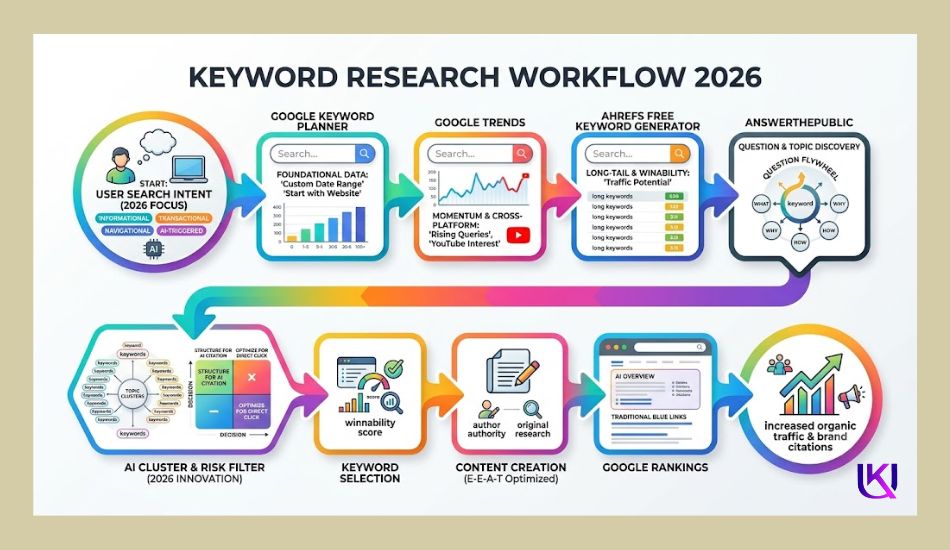
Best Free SEO Tools in 2026
If you are not sure where to start, this comparison table gives you a quick overview of the best free SEO tools in 2026. Each tool has a different purpose. Some help you find keywords, while others improve technical SEO, track website performance, or identify ranking opportunities.
| SEO Tool | Best For | Key Free Features | Main Limitation | Best For |
| Google Search Console | Website performance | Search queries, clicks, impressions, indexing reports, Core Web Vitals | Only works for websites you own | Website owners |
| Google Keyword Planner | Keyword research | Keyword ideas, search volume ranges, keyword forecasts | Exact search volume may require active Google Ads spend | Beginners, marketers |
| Google Trends | Search trends | Trending topics, seasonal trends, regional interest, keyword comparison | Does not show search volume | Bloggers, content creators |
| Ahrefs Webmaster Tools | Technical SEO | Site audit, backlink checker, internal link reports | Requires website verification | Website owners |
| Ahrefs Free Keyword Generator | Keyword ideas | Keyword suggestions, keyword difficulty, related keywords | Limited daily searches | Bloggers, beginners |
| Ubersuggest | SEO research | Keyword ideas, content ideas, basic SEO audit | Daily search limit | Small businesses |
| Moz Free SEO Tools | SEO analysis | Keyword Explorer, Domain Analysis, basic SERP insights | Limited monthly searches | SEO beginners |
| Screaming Frog SEO Spider | Website audits | Crawl website, find broken links, missing titles, redirects | Free version crawls up to 500 URLs | Small to medium websites |
| AnswerThePublic | Content ideas | Question keywords, search intent, topic ideas | Daily search limit | Content marketers |
| Keyword Surfer | Browser keyword research | Search volume, related keywords, content ideas directly in Google Search | Chrome extension only | Bloggers |
| SEOquake | On-page SEO | Page analysis, SEO metrics, internal and external link data | Browser extension only | SEO professionals |
| Bing Webmaster Tools | Bing SEO | Site scan, keyword reports, indexing, SEO reports | Focused on Bing Search | Website owners |
| PageSpeed Insights | Website speed | Core Web Vitals, mobile and desktop performance reports | Only analyzes one page at a time | Developers, site owners |
| Rich Results Test | Structured data | Check schema markup and rich result eligibility | Tests structured data only | Website owners |
Which Tool Should You Use First?
If you’re starting with SEO, you do not need to install every tool on this list. Begin with the ones that solve your biggest problem.
- Need keyword ideas? Start with Google Keyword Planner, Google Trends, and Ahrefs Free Keyword Generator.
- Want to improve your Google rankings? Use Google Search Console to see how your pages perform.
- Need a website health check? Try Screaming Frog SEO Spider and PageSpeed Insights.
- Looking for content ideas? Use AnswerThePublic and Keyword Surfer.
- Want to find technical SEO issues? Use Ahrefs Webmaster Tools and Rich Results Test.
This table gives you a quick overview, but every tool has unique strengths. In the next section, you’ll learn what each free SEO tool does, its best features, its limitations, and when you should use it.
Best Free SEO Tools in 2026 That Actually Work
The best free SEO tools can help you find better keywords, fix website problems, and improve your Google rankings without paying for expensive software. The key is choosing the right tool for the job.
Below, you will learn what each tool does, who it is best for, its biggest strengths, and where its free version has limits.
1. Google Search Console: Best Overall Free SEO Tool
If you own a website, Google Search Console should be the first SEO tool you set up. It is free, comes directly from Google, and shows how your website performs in Google Search.
Instead of guessing why a page ranks or loses traffic, you can see real data from Google.
Best Features:
- Track clicks and impressions
- See which keywords bring visitors
- Monitor average search position
- Find indexing problems
- Submit XML sitemaps
- Check Core Web Vitals
- Discover crawl errors
- Identify pages that need improvement
| Best For | Pros | Limitations |
| Beginners | Completely free | Only works for websites you own |
| Bloggers | Data comes directly from Google | Does not provide competitor keyword research |
| Small businesses | Helps improve search visibility | |
| Ecommerce websites | Great for monitoring SEO performance | |
| SEO professionals |
2. Google Keyword Planner: Best Free Keyword Research Tool
When you need new keyword ideas, Google Keyword Planner is one of the best places to start. Although it was built for Google Ads, many SEO professionals use it to discover search topics and keyword opportunities.
It helps you understand what people search for and how competitive a keyword may be.
Best Features
- Discover keyword ideas
- View search volume ranges
- Group related keywords
- Find long-tail keywords
- Compare keyword trends
- Estimate keyword competition
| Best For | Pros | Limitations |
| Keyword research | Free with a Google account | Exact search volume may require active Google Ads campaigns |
| New blog topics | Trusted Google data | SEO metrics are limited compared to premium tools |
| Local SEO | Excellent for finding keyword ideas | |
| Content planning |
3. Google Trends: Best for Finding Trending Topics
Search behavior changes every day. Google Trends helps you see which topics are growing and which are losing interest.
This makes it a great tool for planning seasonal content and identifying rising search opportunities before your competitors do.
Best Features
- Compare search terms
- Discover trending topics
- View seasonal search patterns
- Analyze regional interest
- Explore related searches
| Best For | Pros | Limitations |
| Content creators | Completely free | Does not show actual search volume |
| Bloggers | Easy to understand | Works best when paired with keyword research tools |
| News websites | Great for content planning | |
| Seasonal businesses | Helps identify emerging trends |
4. Ahrefs Webmaster Tools: Best Free Technical SEO Tool
If you want to improve your website’s health, Ahrefs Webmaster Tools is one of the strongest free options available.
It scans your website and highlights technical SEO issues that could affect rankings.
Best Features
- Website audit
- Backlink overview
- Internal link reports
- Broken page detection
- Crawl issue reports
- SEO health score
| Best For | Pros | Limitations |
| Technical SEO | Powerful free site audit | Requires website verification |
| Website maintenance | Helpful backlink insights | Advanced backlink research is part of the paid plan |
| SEO audits | Easy-to-read reports | Not growing websites |
5. Ahrefs Free Keyword Generator: Best for Quick Keyword Ideas
If you need keyword ideas without creating a full SEO project, Ahrefs Free Keyword Generator is a fast and simple choice.
Enter a topic, and it provides keyword suggestions, keyword difficulty, and related search terms.
Best Features
- Keyword ideas
- Long-tail keywords
- Keyword difficulty
- Related search terms
- Question keywords
| Best For | Pros | Limitations |
| Beginners | Fast and simple to use | Daily search limits |
| Bloggers | Good keyword suggestions | Fewer keyword metrics than the paid version |
| Niche websites | Helpful for finding long-tail keywords | |
| Content planning | Branding search for users |
These five tools give you a strong foundation for keyword research, website optimization, and technical SEO. In the next section, we’ll cover more free tools, including Ubersuggest, Moz Free SEO Tools, AnswerThePublic, Keyword Surfer, SEOquake, Bing Webmaster Tools, PageSpeed Insights, and Rich Results Test, which can build a complete free SEO toolkit.
Best More Free SEO Tools Worth Using in 2026
The tools above cover the basics, but they are not the only free SEO tools that can help you grow your website. The tools below are useful for finding new content ideas, checking website health, improving page speed, and understanding your competitors.
Using a mix of these tools gives you a more complete SEO strategy without spending money.
1. Ubersuggest: Best for All-in-One SEO Research
Ubersuggest is a beginner-friendly SEO tool that combines keyword research, website audits, backlink analysis, and content ideas in one place.
If you want one dashboard for several SEO tasks, this is a great option.
Best Features
- Keyword ideas
- Search volume
- SEO difficulty
- Content ideas
- Backlink overview
- Site audit
- Competitor research
Best For
- Beginners
- Bloggers
- Small business websites
- Content marketers
Pros
- Easy-to-use dashboard
- Covers multiple SEO tasks
- Helpful content suggestions
Limitations
- Daily searches are limited in the free version
- Advanced reports require a paid plan
2. Moz Free SEO Tools: Best for Learning SEO Basics
Moz offers several free SEO tools that help you research keywords, check your website’s authority, and understand search results.
Its clean interface makes it a good choice if you are new to SEO.
Best Features
- Keyword Explorer
- Domain Analysis
- Link Explorer
- SERP Analysis
- SEO learning resources
Best For
- SEO beginners
- Bloggers
- Website owners
Pros
- Trusted SEO brand
- Easy-to-read reports
- Helpful educational content
Limitations
- Monthly searches are limited
- Some advanced features require a subscription
3. AnswerThePublic: Best for Finding Question Keywords
If you want to write content that answers real questions, AnswerThePublic is one of the best free tools available.
It collects search queries people type into Google and organizes them into easy-to-understand topics.
Best Features:
- Question keywords
- Related searches
- Preposition keywords
- Comparison keywords
- Topic ideas
Best For:
- Blog writing
- FAQ pages
- Content planning
- Voice search optimization
Pros:
- Great for understanding search intent
- Helps create helpful content
- Finds long-tail keyword ideas
Limitations:
- Free searches are limited each day
- Does not include detailed SEO metrics
4. Keyword Surfer: Best Browser Extension for Keyword Research
Keyword Surfer works directly inside Google Search. As you search, it shows keyword data without opening another website.
This makes keyword research faster and easier.
Best Features:
- Search volume
- Related keywords
- Similar searches
- Content suggestions
- Estimated traffic
Best For:
- Bloggers
- Content creators
- Quick keyword research
Pros:
- Free Chrome extension
- Saves time
- Simple to use
Limitations:
- Works only in supported browsers
- Keyword data is less detailed than premium tools
5. SEOquake: Best for Quick On-Page SEO Analysis
SEOquake is another browser extension that lets you review SEO data while visiting any webpage.
It is useful when you want to compare your pages with competitors.
Best Features:
- On-page SEO analysis
- Meta tag review
- Heading structure
- Internal and external links
- Page SEO metrics
Best For:
- On-page SEO
- Competitor research
- Quick page analysis
Pros:
- Easy to install
- Fast SEO checks
- Helpful for page comparisons
Limitations:
- Browser extension only
- Some metrics depend on third-party data
6. Bing Webmaster Tools: Best Free Tool for Bing Search
Google is the largest search engine, but Bing still brings valuable traffic to many websites. Bing Webmaster Tools helps you monitor and improve your site’s performance in Bing Search.
Best Features:
- Website scan
- Indexing reports
- Keyword performance
- SEO recommendations
- XML sitemap submission
Best For:
- Website owners
- Small businesses
- SEO professionals
Pros:
- Completely free
- Easy setup
- Useful technical SEO reports
Limitations:
- Data focuses on Bing Search
- Smaller search market than Google
7. PageSpeed Insights: Best for Website Speed
A slow website can hurt both user experience and Google rankings. PageSpeed Insights analyzes your pages and shows how to improve loading speed.
Best Features:
- Core Web Vitals
- Mobile performance
- Desktop performance
- Speed recommendations
- Performance score
Best For:
- Website owners
- Developers
- Technical SEO
Pros:
- Free Google tool
- Easy performance reports
- Actionable improvement tips
Limitations:
- Tests one page at a time
- Does not monitor your entire website
8. Rich Results Test: Best for Schema Markup
If you use structured data or schema markup, the Rich Results Test helps you check whether your pages are eligible for rich results in Google Search.
Rich results can improve visibility by displaying extra information, such as ratings, FAQs, recipes, or product details.
Best Features:
- Validate structured data
- Test schema markup
- Detect markup errors
- Preview rich result eligibility
Best For:
- Technical SEO
- Website owners
- Developers
Pros:
- Free Google tool
- Simple to use
- Helps improve search appearance
Limitations:
- Only checks structured data
- Does not provide general SEO recommendations
Key Takeaway
No single free SEO tool can do everything. The best approach is to combine several trusted tools based on your goals.
For example:
- Use Google Keyword Planner and Google Trends to discover keyword ideas.
- Use Google Search Console to monitor your search performance.
- Use Ahrefs Webmaster Tools and Screaming Frog SEO Spider to fix technical SEO issues.
- Use AnswerThePublic to understand user intent and create helpful content.
- Use PageSpeed Insights and Rich Results Test to improve your website’s performance and visibility.
By using these tools together, you can build a strong SEO workflow, make better decisions, and increase your chances of earning more organic traffic in 2026.
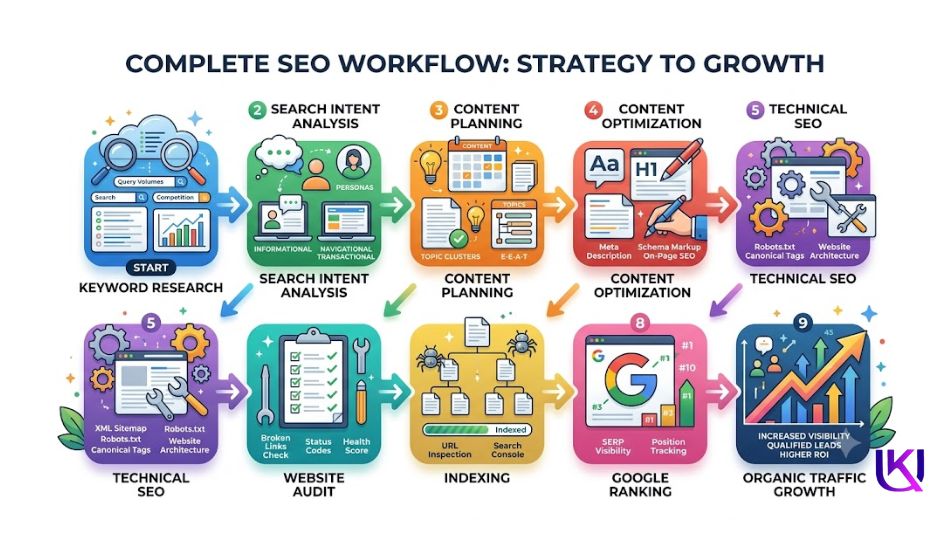
Which Are the Best Free SEO Tools by SEO Task?
Every SEO tool has a different purpose. Some help you find keywords, while others improve your website’s technical health or track your search performance. Instead of using one tool for everything, choose the tool that matches the task you want to complete.
Here are the best free SEO tools for each part of your SEO strategy.
1. Best Free Tools for Keyword Research
Finding the right keywords is the first step to creating content that people actually search for. A good keyword research tool helps you discover new ideas, understand search demand, and match your content with user intent.
Top Picks
| Tool | Best Use |
| Google Keyword Planner | Find keyword ideas and search volume ranges |
| Google Trends | Discover trending and seasonal topics |
| Ahrefs Free Keyword Generator | Find long-tail keywords and keyword difficulty |
| Ubersuggest | Explore keyword ideas and competitor keywords |
| Keyword Surfer | Research keywords directly in Google Search |
| AnswerThePublic | Find question-based keywords and content ideas |
- Best Choice for Beginners: Google Keyword Planner
- Best Choice for Content Creators: AnswerThePublic
2. Best Free Tools for Technical SEO
Technical SEO helps search engines crawl, index, and understand your website. Even the best content may not rank if your website has technical problems.
Top Picks
| Tool | Best Use |
| Google Search Console | Monitor indexing and crawl issues |
| Screaming Frog SEO Spider | Find broken links, redirects, and missing tags |
| Ahrefs Webmaster Tools | Run complete website audits |
| PageSpeed Insights | Improve Core Web Vitals and page speed |
| Rich Results Test | Check schema markup and structured data |
- Best Choice for Beginners: Google Search Console
- Best Choice for Website Audits: Screaming Frog SEO Spider
3. Best Free Tools for Content Optimization
Helpful content answers the reader’s questions and matches their search intent. These tools help you find new topics and improve your content before publishing.
Top Picks
| Tool | Best Use |
| Google Trends | Find popular and trending topics |
| AnswerThePublic | Discover questions people ask |
| Keyword Surfer | Find related keywords while searching |
| Ubersuggest | Generate content ideas and keyword suggestions |
- Best Choice for Beginners: Google Trends
- Best Choice for Blog Planning: AnswerThePublic
4. Best Free Tools for Website Audits
A website audit helps you identify SEO issues that could stop your pages from ranking well.
Top Picks
| Tool | Best Use |
| Screaming Frog SEO Spider | Full website crawl and SEO audit |
| Ahrefs Webmaster Tools | Technical health reports |
| Google Search Console | Indexing and coverage reports |
These tools help you detect:
- Broken links
- Missing title tags
- Duplicate meta descriptions
- Redirect errors
- Crawl issues
- Indexing problems
- Internal linking issues
5. Best Free Tools for Backlink Analysis
Backlinks remain one of Google’s important ranking signals. While free tools have limits, they can still help you monitor your backlink profile.
Top Picks
| Tool | Best Use |
| Ahrefs Webmaster Tools | View backlinks to your website |
| Moz Link Explorer | Check basic backlink data |
| Google Search Console | See websites linking to your pages |
These link-building tools help you:
- Monitor new backlinks
- Find your most linked pages
- Discover linking websites
- Spot broken backlinks
6. Best Free Tools for Tracking SEO Performance
SEO is not a one-time task. You need to measure results to know what is working.
Top Picks
| Tool | Best Use |
| Google Search Console | Track clicks, impressions, CTR, and rankings |
| Google Analytics 4 | Measure organic traffic and user behavior |
| Bing Webmaster Tools | Monitor Bing Search performance |
Watch these key metrics:
- Organic traffic
- Click-through rate (CTR)
- Average keyword position
- Impressions
- Indexed pages
- Core Web Vitals
- User engagement
7. Recommended Free SEO Tool Stack for Beginners
If you are starting, you do not need dozens of tools. This simple combination covers almost every important SEO task.
| SEO Task | Recommended Free Tool |
| Keyword Research | Google Keyword Planner |
| Search Trends | Google Trends |
| Website Performance | Google Search Console |
| Technical SEO | Screaming Frog SEO Spider |
| Website Audit | Ahrefs Webmaster Tools |
| Content Ideas | AnswerThePublic |
| Page Speed | PageSpeed Insights |
| Schema Testing | Rich Results Test |
Using these tools together gives you a complete SEO workflow from finding the right keywords to fixing technical issues and measuring your results.
As your website grows, you can decide whether you need paid tools, but this free toolkit is more than enough to build a strong SEO foundation.
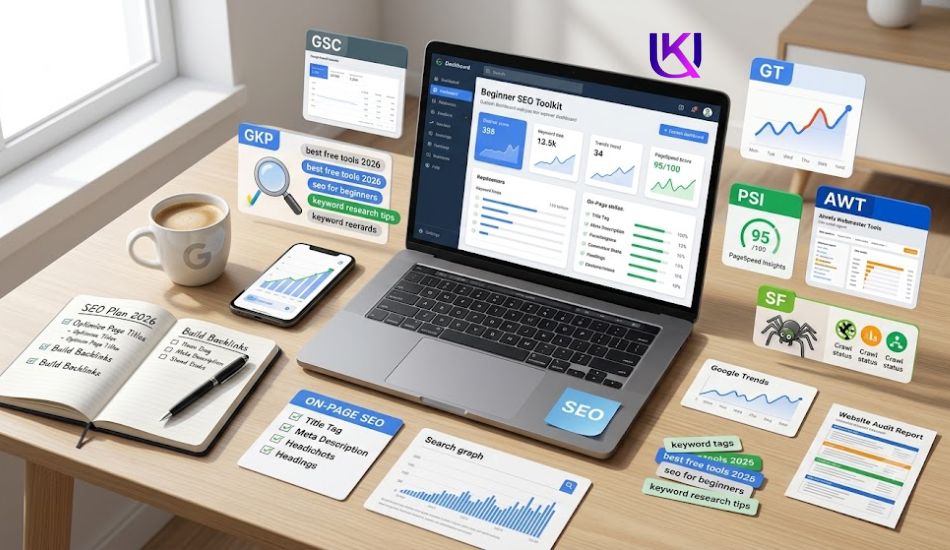
Beginner’s Guide: Which Free SEO Tool Is Right for You?
The best free SEO tool depends on your goals. A blogger does not need the same features as an online store or an SEO agency. Instead of trying every tool, start with the ones that solve your biggest problem.
Use the guide below to find the right tool for your needs.
1. If You Are a Beginner
If you are new to SEO, focus on learning the basics before using advanced features. Start with tools that are simple, free, and trusted.
Recommended Tools
- Google Search Console
- Google Keyword Planner
- Google Trends
- PageSpeed Insights
These tools help you:
- Find keyword ideas
- Understand search intent
- Monitor your website in Google Search
- Improve page speed
- Learn how SEO works with real data
Why They Work
They come directly from Google, are easy to use, and provide reliable information without overwhelming you.
2. If You Are a Blogger or Content Creator
Your main goal is to publish content that answers people’s questions and attracts organic traffic.
Recommended Tools
- AnswerThePublic
- Google Trends
- Ahrefs Free Keyword Generator
- Keyword Surfer
- Google Search Console
These tools help you:
- Find blog topics
- Discover long-tail keywords
- Answer common questions
- Track which articles bring traffic
- Plan content around user intent
Why They Work
They help you create content that matches what people are actively searching for instead of writing based on guesswork.
3. If You Own a Small Business
Small business websites need local visibility, qualified traffic, and steady growth without spending a large budget.
Recommended Tools
- Google Search Console
- Google Keyword Planner
- Google Trends
- PageSpeed Insights
- Bing Webmaster Tools
These tools help you:
- Find local keyword opportunities
- Improve website performance
- Fix technical SEO issues
- Monitor search visibility
- Reach customers through Google and Bing
Why They Work:
They give you the data needed to improve your website and attract more potential customers.
4. If You Run an Ecommerce Website
Online stores often have hundreds of pages, making technical SEO more important.
Recommended Tools
- Screaming Frog SEO Spider
- Ahrefs Webmaster Tools
- Google Search Console
- Rich Results Test
- PageSpeed Insights
These tools help you:
- Find broken product links
- Check indexing
- Improve product page speed
- Validate product schema
- Monitor technical SEO health
Why They Work
A technically healthy ecommerce site is easier for search engines to crawl and provides a better shopping experience for customers.
5. If You Are an SEO Professional
Experienced SEO users often combine multiple free tools to collect more complete data.
Recommended Tools
- Google Search Console
- Ahrefs Webmaster Tools
- Screaming Frog SEO Spider
- Ubersuggest
- Moz Free SEO Tools
- Google Trends
- Keyword Surfer
These tools help you:
- Analyze website performance
- Research keywords
- Audit technical SEO
- Review backlinks
- Compare search trends
- Find optimization opportunities
Why They Work
Using several tools together gives you a broader view of your SEO performance than relying on a single platform.
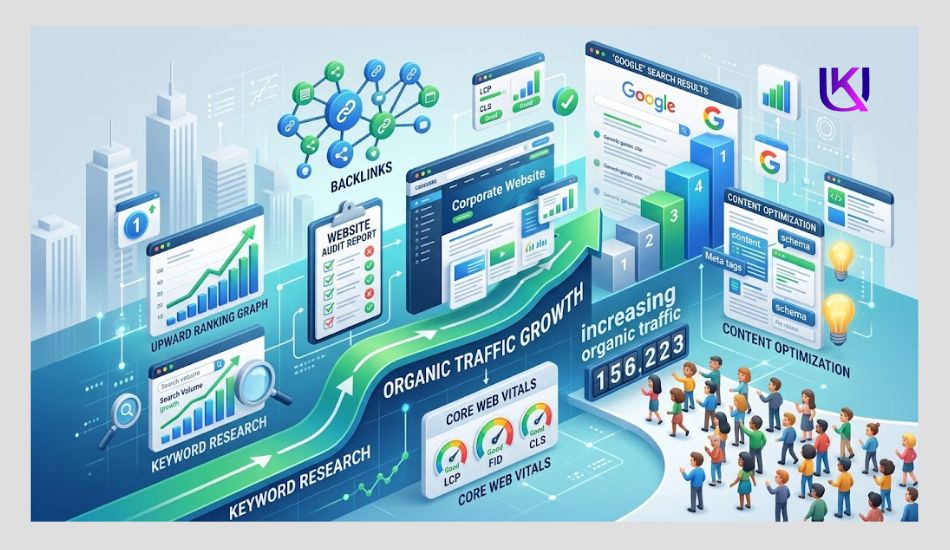
Quick Recommendation: Do Free SEO Tools Help Improve Google Rankings?
Free SEO tools do not improve rankings on their own. Instead, they help you make better SEO decisions.
| If You Are… | Start With |
| Beginner | Google Search Console + Google Keyword Planner |
| Blogger | AnswerThePublic + Google Trends |
| Small Business Owner | Google Search Console + PageSpeed Insights |
| Ecommerce Store Owner | Screaming Frog SEO Spider + Ahrefs Webmaster Tools |
| SEO Professional | Google Search Console + Screaming Frog + Ahrefs Webmaster Tools |
Key Takeaway: Which SEO Tool is Best For Beginners?
There is no single best free SEO tool for everyone. The right choice depends on what you want to achieve.
If you are just getting started, begin with Google Search Console, Google Keyword Planner, and Google Trends. As your website grows, add tools like Ahrefs Webmaster Tools, Screaming Frog SEO Spider, and AnswerThePublic to strengthen your keyword research, technical SEO, and content strategy.
By choosing tools that match your goals, you can build an effective SEO workflow, improve your rankings, and grow your organic traffic without paying for expensive software.
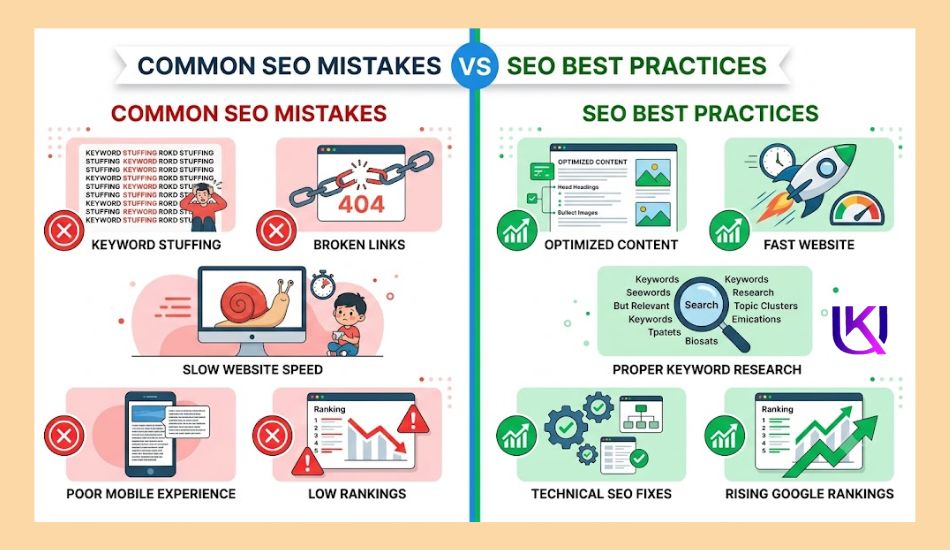
Common Mistakes When Using Free SEO Tools
Free SEO tools can help you improve your website, but they only work when you use them the right way. Many beginners collect lots of data but never turn it into action. Others trust one tool too much or focus on the wrong keywords.
Avoid these common mistakes to get better SEO results.
1. Using Only One SEO Tool
No free SEO tool does everything. One tool may be great for keyword research, while another is better for technical SEO or website performance.
For example:
- Google Search Console shows how your website performs in Google Search.
- Google Keyword Planner helps you find keyword ideas.
- Google Trends shows search interest over time.
- Ahrefs Webmaster Tools helps you find technical issues.
- PageSpeed Insights measures website speed.
What to Do Instead
Combine two or more trusted tools to get a complete view of your SEO performance.
2. Choosing Keywords Based Only on Search Volume
Many beginners think the highest search volume is always the best choice. That is not true.
A keyword with 50,000 monthly searches is often very competitive. A long-tail keyword with 500 searches may be much easier to rank for and can bring visitors who are ready to take action.
For example:
- SEO tools (Wrong)
- Best free SEO tools for beginners (Correct)
The second keyword has clearer search intent and is more likely to attract the right audience.
What to Do Instead
Choose keywords based on:
- User intent
- Relevance
- Keyword difficulty
- Content quality
- Business goals
3. Ignoring Search Intent
One of the biggest SEO mistakes is writing content that does not answer the user’s question.
Ask yourself:
- Does this page solve the reader’s problem?
- Does the title match what people expect?
- Is the information complete and easy to understand?
Google rewards content that satisfies search intent, not content that simply repeats keywords.
What to Do Instead
Create helpful content that answers real questions and provides practical solutions.
4. Forgetting Technical SEO
Even great content can struggle to rank if your website has technical problems.
Common issues include:
- Broken links
- Slow page speed
- Missing title tags
- Missing meta descriptions
- Crawl errors
- Indexing problems
- Poor mobile experience
These issues make it harder for search engines to crawl and understand your website.
What to Do Instead
Run regular website audits using tools like Google Search Console, Screaming Frog SEO Spider, and Ahrefs Webmaster Tools.
5. Never Checking Your SEO Results
SEO is an ongoing process. Publishing a page is only the beginning.
If you never check your results, you will not know:
- Which keywords are ranking
- Which pages need updates
- Which content brings traffic
- Which pages lose visibility
What to Do Instead
Review your SEO performance every month using:
- Google Search Console (UGS)
- Google Analytics 4
- Bing Webmaster Tools
Track important metrics such as:
- Organic traffic
- Clicks
- Impressions
- Average position
- Click-through rate (CTR)
- Indexed pages
6. Expecting Instant Rankings
Many people think a free SEO tool will move their website to the first page of Google in a few days.
That is not how SEO works.
SEO tools provide data and recommendations, but your rankings improve because you:
- Choose the right keywords
- Create helpful content
- Fix technical issues
- Build trust over time
- Keep your content updated
SEO is a long-term strategy, and consistent improvement usually brings better results than chasing quick wins.
Key Takeaway: Choose the Best Free SEO Tools and Start Growing Your Website.
Free SEO tools are powerful, but they are only part of the process. The biggest improvements come from using the data to make better decisions.
Focus on understanding search intent, choosing relevant keywords, improving your website’s technical health, and creating content that genuinely helps your readers. When you combine these practices with trusted free SEO tools, you build a stronger foundation for long-term organic growth.
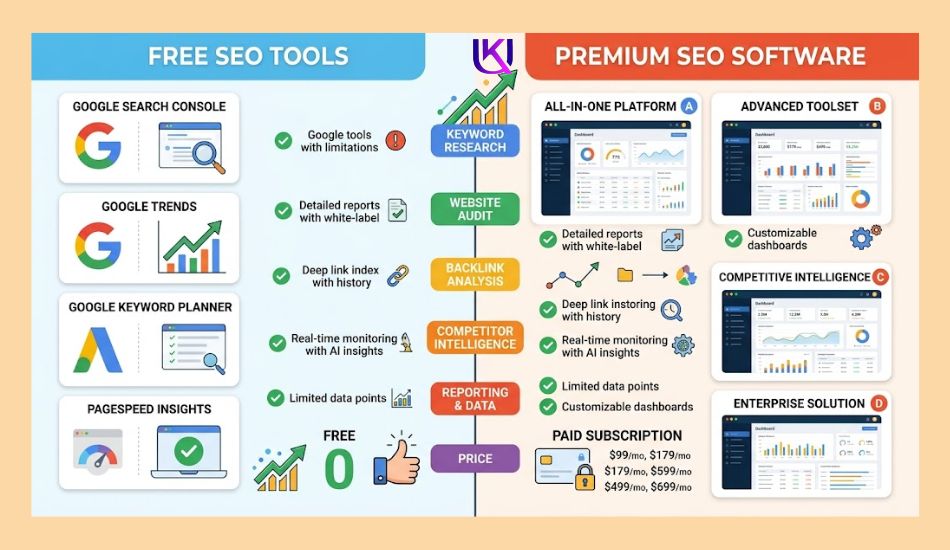
Conclusion: Best Free SEO Tools 2026 That Actually Work (Tested & Compared)
Finding the best free SEO tools 2026 does not have to be difficult. You do not need expensive software to improve your website or reach more people through Google Search. What matters most is using the right tools for the right tasks.
You don’t need a big budget to start ranking in 2026. Pick two tools from this list. Use them for one month. Track what changes.
The tools matter less than what you do with them. A free tool used every week beats an expensive tool that sits open in a browser tab, forgotten.
If you are just getting started, begin with Google Search Console, Google Keyword Planner, and Google Trends. These free tools help you understand your audience, discover keyword opportunities, and track your website’s performance.
As your SEO skills grow, add tools like Ahrefs Webmaster Tools, Screaming Frog SEO Spider, AnswerThePublic, PageSpeed Insights, and Rich Results Test. Together, they help you improve technical SEO, create better content, fix website issues, and build a stronger SEO strategy.
But you must take care about that; no SEO tool can guarantee first-page rankings. The best results come from combining reliable data with helpful content that matches search intent and solves real problems for your readers. Keep learning, monitor your progress, and update your pages regularly.
Start with a few trusted free tools, use them consistently, and take action on the insights they provide. Small improvements made over time can lead to better Google rankings, more organic traffic, and steady growth for your website.
Your Next Steps
If you’re ready to improve your SEO today, follow this simple plan:
- Set up Google Search Console (GSC) and verify your website.
- Research one target keyword using Google Keyword Planner.
- Check search trends with Google Trends.
- Audit your website using Ahrefs Webmaster Tools or Screaming Frog SEO Spider.
- Fix any technical issues you find.
- Publish helpful content that answers your audience’s questions.
- Review your SEO performance every month and continue improving.
SEO is a long-term investment, not a one-time task. With the right free tools and a consistent strategy, you can build lasting search visibility without a large budget.
Helpful article: What Is SEO and How Does It Really Work in 2026?
FAQs: Best Free SEO Tools in 2026: Expert Picks for Better Rankings.
1. Are free SEO tools accurate enough to rank in 2026?
Yes, for the most part. Tools built on real Google data, like Search Console and Keyword Planner, are as accurate as anything you’ll find in a paid tool. Third-party tools that estimate volume can be less exact, but they’re still useful for spotting patterns and ideas.
2. What is the best free keyword research tool in 2026?
Google Search Console (GSC) is the strongest starting point because it shows real data from your own site. If you need new keyword ideas instead of existing ranking data, pair it with Google Keyword Planner.
3. Can free SEO tools replace paid tools like Ahrefs or Semrush?
For basic keyword research, yes, especially if you’re starting out. Paid tools add extra features like backlink tracking and bigger keyword databases. But you can build a full content plan using only free tools.
4. How many keywords should I target in one blog post?
Focus on one main keyword and 3 to 5 related terms per post. Trying to target too many keywords in one article usually makes the content weaker, not stronger.
5. Do free SEO tools work for local businesses?
Yes. Google Trends and Google Search Console (GSC) both offer location data. You can see which cities or regions search for your keywords the most, then shape your content around that.
6. Are free SEO tools accurate?
Most trusted free SEO tools provide useful data, but no tool is perfectly accurate. Search volume, keyword difficulty, and traffic estimates may vary because each platform uses different data sources and calculation methods. For better decisions, compare information from multiple trusted tools instead of relying on one report.
7. How many SEO tools should I use?
You do not need dozens of tools. For most beginners and small businesses, three to five trusted tools are enough. A simple toolkit might include: Google Search Console, Google Keyword Planner, Google Trends, Ahrefs Webmaster Tools, and PageSpeed Insights. This combination covers keyword research, technical SEO, website performance, and content planning.