

Shopify SEO USA can help you reach more US shoppers, but ranking a Shopify store takes more than adding keywords to product pages.
You may already have good products, a fast-looking store, and pages that work well for customers. Yet Google may still miss some of your products, index the wrong URLs, or give your collection pages less visibility than they deserve.
Problems with the technical SEO part of crawlability, indexing, canonical URLs, duplicate content, internal links, XML sitemaps, robots.txt, and Core Web Vitals can quietly limit your organic traffic.
A strong Shopify SEO plan fixes these technical issues first. Then you can improve your product pages, collection pages, Product schema, mobile SEO, and content around what US shoppers actually search for.
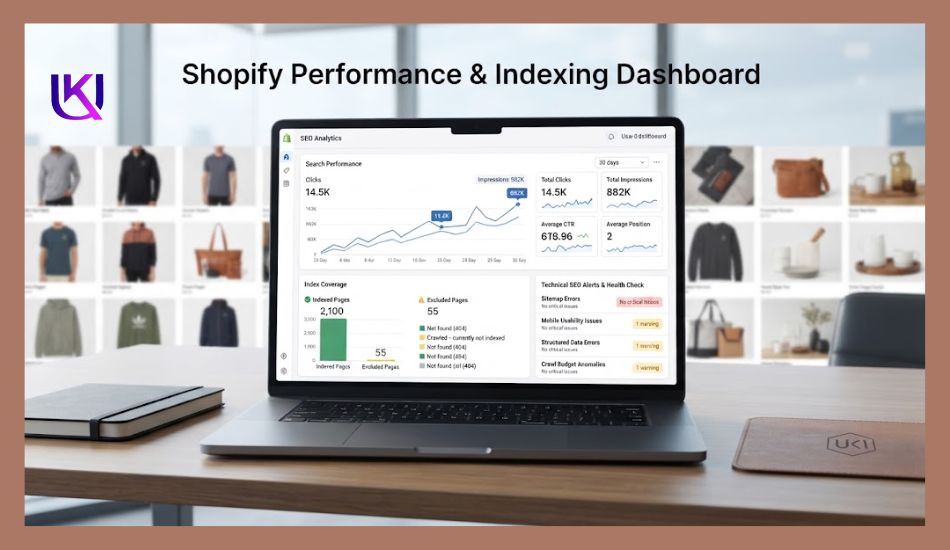
Google Search Console helps you find indexing and search performance problems, while Google Merchant Center and Google Shopping can support product visibility across Google’s shopping results.
You also need to show Google that your store is trustworthy and useful.
Clear product information, real business details, helpful content, secure shopping, reviews, and a good customer experience all support stronger E-E-A-T signals.
This guide shows you how to build a technical SEO system for your Shopify store, find the issues that can hold your pages back, and turn organic search traffic into more qualified visits and sales in the US market.

What Is Shopify SEO for US Stores?
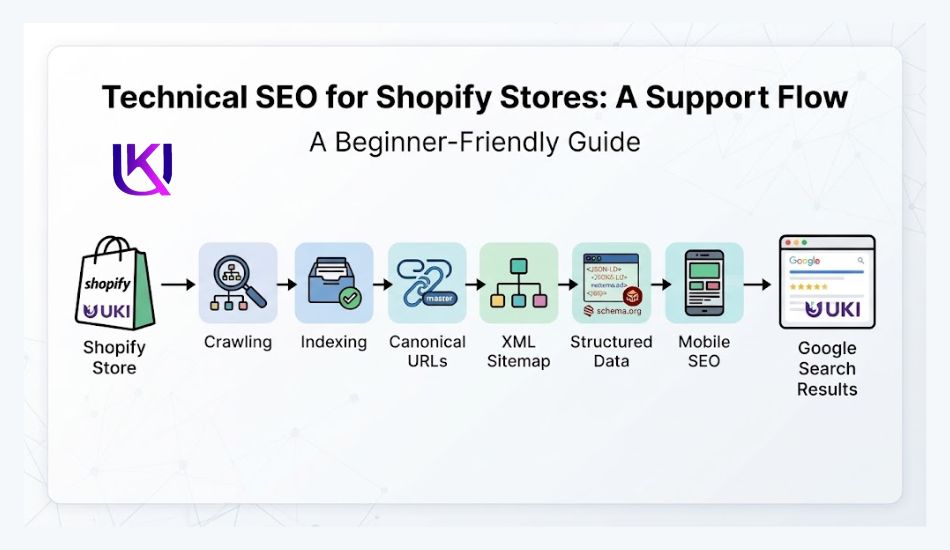
Shopify SEO is the process of making your Shopify store easier for Google to crawl, understand, index, and rank.
For a US e-commerce store, the goal is not simply to get more visitors. You want to reach people who are searching for the products you sell and are ready to take action.
A technical SEO playbook for US e-commerce owners who want more organic traffic in 2026
Your Shopify store looks good. The products are solid. But nobody finds it on Google.
Sound familiar?
This happens to thousands of US store owners every year. You build a nice shop. You add real products. Then you wait for sales. And you wait some more.
The problem usually isn’t your store. It’s what happens behind the scenes. The technical stuff shoppers never see, but Google checks every single day.
This guide walks you through real, working fixes. Not tips you have already read ten times before.
We will cover duplicate pages that confuse Google, out-of-stock products that quietly hurt your rankings, and filter links that waste your crawl budget.
Every fix here works for real US Shopify stores in 2026.
Grab a coffee. Let’s fix your store.
What Is the Right Shopify SEO Strategy for US E-Commerce Stores?
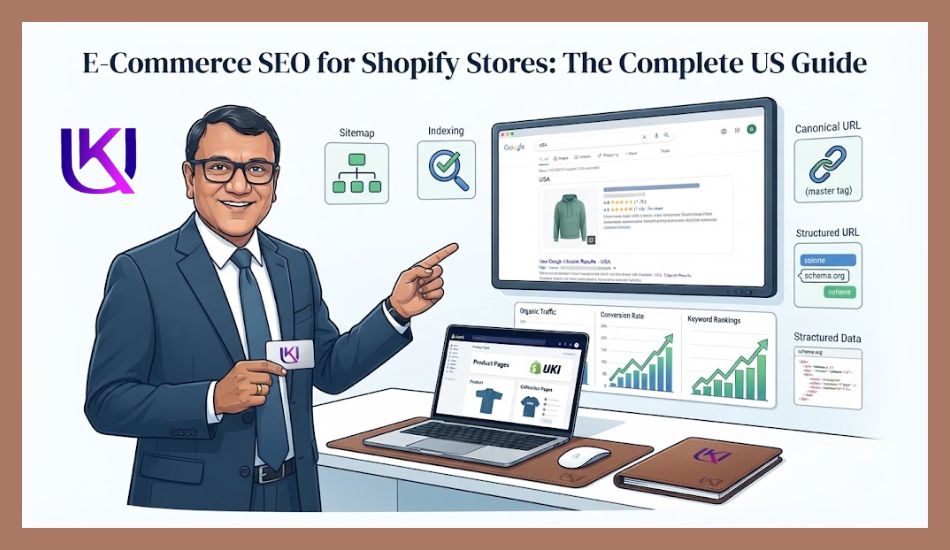
Your Shopify store has several parts that can affect organic search:
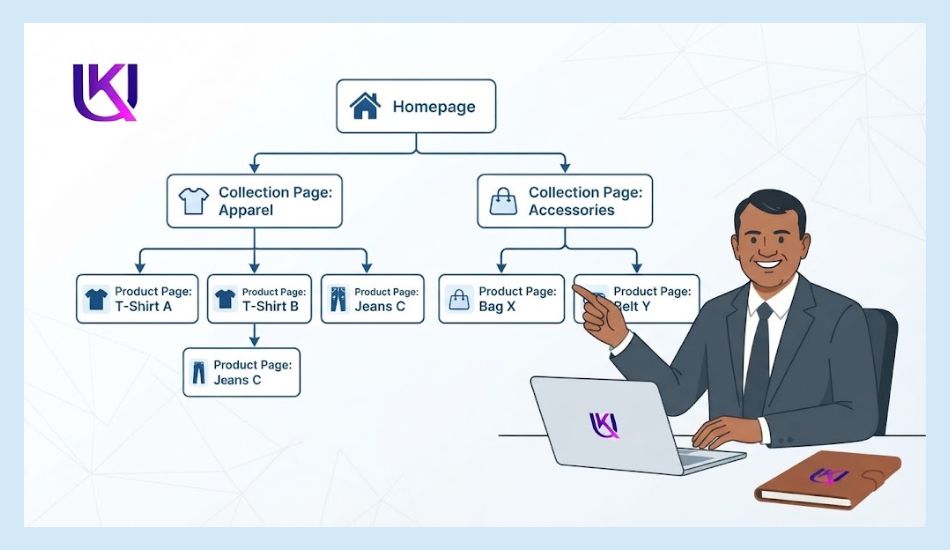
- Product pages target searches for specific products.
- Collection pages target broader product searches.
- Internal links help Google discover related pages.
- Canonical URLs help Google understand which page should be indexed.
- XML sitemaps help search engines discover important URLs.
- Structured data helps Google understand product details.
- Mobile performance affects how customers use your store.
- Core Web Vitals measure important parts of page experience.
- Google Search Console shows how your pages perform in Google Search.
This is why Shopify SEO USA should start with your store’s technical setup. If Google cannot properly crawl or understand an important page, better product copy alone may not solve the problem.
Once the technical foundation is working, you can focus on search intent, product content, collection pages, and other areas that can help you attract the right US shoppers.
Why US Shopify Stores Need a Different SEO Approach
Most SEO guides are written for anyone, anywhere. But US e-commerce has its own rules.
You compete with huge brands like Amazon, Walmart, and Target. Your shoppers search in specific ways, using words like “buy,” “near me,” and “free shipping.”
Google’s AI tools, like AI Overviews, now answer many of these searches before a shopper even clicks a link.
US shoppers also care a lot about trust. They want to see real reviews, a clear return policy, and a secure checkout. Google notices this too. Trust signals count as part of technical SEO now, not just marketing.
Shipping is another US-only detail worth watching. Shoppers across fifty states expect clear shipping times and honest tax totals before checkout. A confusing shipping page can hurt conversions even when your rankings are strong.
So a real Shopify SEO USA strategy blends three things:
- Clean technical setup that search engines can crawl fast
- Content that matches how Americans actually search
- Trust signals that turn a click into a sale
Let’s start with the technical fixes most store owners never even know are hurting them.
The Duplicate Page Problem Costing You Rankings
Here is something most guides skip completely.
Shopify can create two different web addresses for the same product. One looks like this:
yourstore.com/collections/shoes/products/red-sneakers
The other looks like this:
yourstore.com/products/red-sneakers
To you, it is one product. To Google, it can look like two separate pages with the same content. This confuses search engines. They cannot tell which page to rank, so sometimes neither one ranks well.
| Quick Check: Open any product page on your store and look at the web address. If you see both “/collections/” and “/products/” in the same link, your store likely has this issue. |
The fix is simple. Make sure your theme always links to the short “/products/” version in your navigation and internal links. Check your canonical tags too. Every version of a page should point back to one main URL.
Filter links cause a similar problem, but at a much bigger scale.
When a shopper filters a collection page by color, size, or price, Shopify often builds a brand new web address for that exact combination.
A store with just five colors, five sizes, and three price ranges can create hundreds of these filter pages. None of them have real content. None of them get searched for. But Google still tries to crawl every single one.
This wastes what is called “crawl budget.” That is the limited time and energy Google gives your site to explore new pages.
When that budget goes to filter junk, your new products and blog posts wait longer to get noticed.
How Shopify Handles Common Filter URLs
| URL Type | Example | Shopify’s Default | Your Risk |
| Color or size filter | ?filter.v.option.color=Red | Canonical tag added | Still gets crawled |
| Sort order | ?sort_by=price-ascending | Blocked already | Low risk |
| Single tag page | /collections/shoes/red | Fully indexable | Thin duplicate content |
| “View all” page | /collections/all | Fully indexable | Duplicate product paths |
| Pagination | ?page=2 | Self-canonical | Normal, leave alone |
The fix: add “noindex” tags to thin filter and tag pages, then block the lowest-value filter combinations in your robots.txt file. Keep only your main collection pages open for Google to crawl and rank.
Out-of-Stock Products: A Silent Ranking Killer
You sold out of your best product. Great news for your bank account. Bad news if you handle it wrong.
Many store owners delete out-of-stock pages, or set them to “unpublished.” This feels tidy. But it can quietly hurt your SEO.
Here is why. That product page may have earned links, reviews, and rankings over months or years. Delete it, and you lose all of that work overnight.
Any shopper or search engine that visits the old link now hits a dead end, known as a 404 error.
A better approach looks like this:
Keep the page live, even when the product is sold out
- Mark it clearly as “Out of Stock” or “Sold Out”
- Show a restock date, if you know one
- Link to two or three similar products the shopper might like instead
- Only remove a page for good if the product is gone forever, and redirect the old link to a similar product or the parent collection
This keeps your rankings, your links, and your shopper’s trust, even when a product is temporarily gone.
Core Web Vitals: Why Speed Still Wins in 2026
Google measures how fast your store feels to a real shopper. This is called Core Web Vitals. Three numbers matter most.
- Largest Contentful Paint (LCP): how fast your main image or headline loads. Aim for under 2.5 seconds.
- Interaction to Next Paint (INP): how fast your store reacts when someone taps a button. Aim under 200 milliseconds.
- Cumulative Layout Shift (CLS): how much your page jumps around while loading. Aim under 0.1.
Most Shopify speed problems trace back to one place: apps. Every app you install adds extra code that loads on every single page, even pages that never use that app. Ten apps can mean ten times the loading work for a shopper’s phone.
| Quick Win: Go to Online Store, then Themes, then Edit Code inside your Shopify admin. Check how many apps have added code to your theme. Liquid file, and remove anything you no longer actively use. |
A few simple fixes make a real difference:
- Delete apps you installed once and forgot about.
- Compress product images before uploading, aiming for under 200KB each.
- Switch to a fast, modern theme like Dawn if yours is older than two years.
- Avoid auto-playing videos on your homepage.
A faster store does not just rank better. It converts better too. Shoppers leave slow pages before they even see your products.
Mobile Comes First for US Shoppers
More than half of US online shopping now happens on a phone. Google also ranks the mobile version of your store first, not the desktop version. This is called mobile-first indexing.
Check your store on your own phone once a week. Look for text that is too small, buttons too close together, or images that take too long to appear. These small annoyances add up, and shoppers leave faster than you think.
Your checkout matters even more on mobile. A long, confusing checkout on a small screen sends shoppers straight back to Google to compare other stores.
Schema Markup That Actually Helps Sales
Schema markup is extra code that tells Google exactly what is on your page. Think of it like labels on a filing cabinet. Without labels, Google has to guess. With labels, Google knows instantly.
For Shopify stores, three types of schema matter most.
1. Product Schema
This tells Google your price, stock status, and star rating. It is what makes those small star ratings appear right inside Google search results, before a shopper even clicks.
2. Review Schema
This shows real customer feedback directly in search results. Stores with visible star ratings get more clicks than stores without them, even at the same ranking position.
3. FAQ Schema
This turns your common questions into expandable answers right inside Google’s results page. It takes up more space on the page and can push competitors further down.
Shopify adds basic product schema automatically. But most stores are missing review schema and FAQ schema completely. Adding these takes a bit of technical work, though the payoff often shows up within a few weeks of Google re-crawling your pages.
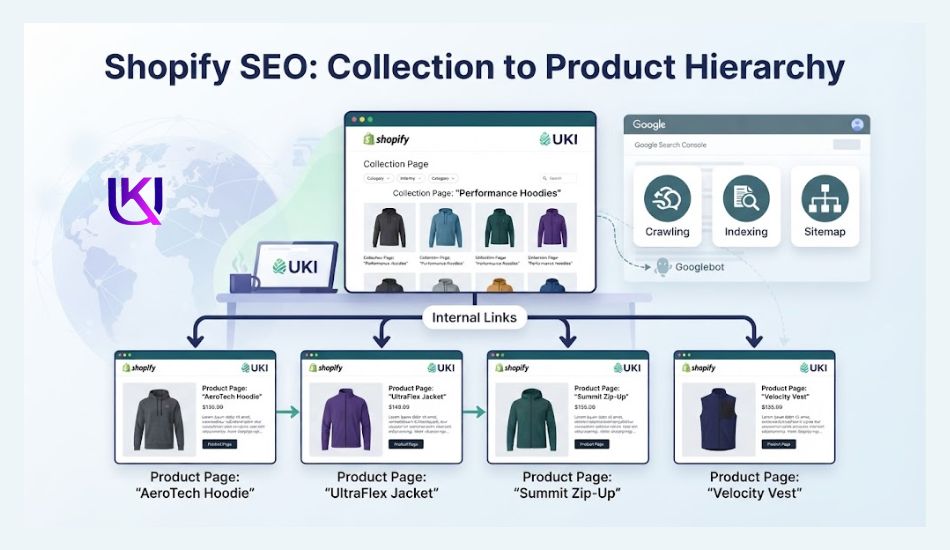
Product and Collection Pages: Get the Basics Right
Your product and collection pages do the real selling. Here is a quick before-and-after look at what changes when you optimize them the right way.
Weak Page vs. Strong Page
| Element | Weak Page | Strong Page |
| Title Tag | Red Sneakers – Shop Now | Men’s Red Running Sneakers, Free US Shipping |
| Description | Buy our red sneakers today. | Lightweight red running sneakers built for daily miles, with free shipping and easy US returns. |
| Images | One stock photo, no alt text | Five or more real photos, descriptive alt text on each |
| Content | One short paragraph | Sizing guide, material info, and real customer questions answered |
| Reviews | None shown | Star rating and written reviews visible |
Notice how the strong page answers real shopper questions before they even have to ask. That is exactly what search engines and shoppers both reward.
Getting Ready for AI Search
Google is not the only place shoppers search anymore. AI Overviews, ChatGPT, and Perplexity now answer product questions directly, sometimes without sending a single click to any website.
To show up inside these AI answers, your content needs clear, direct facts, not vague marketing language. Instead of writing “our premium selection offers unmatched quality, “write” this jacket keeps you warm down to 20 degrees Fahrenheit and weighs under a pound.”
Specific facts win in AI search. Vague claims get ignored.
Add a short FAQ section to your top product and collection pages. Answer the exact questions shoppers type into Google, such as “does this run small” or “is this machine washable.” AI tools tend to pull these direct answers first.

The US Holiday SEO Calendar Most Stores Miss
Google does not wait until Black Friday to notice holiday shopping. It starts adjusting search results weeks earlier, based on what shoppers are already typing in.
Here is a simple timeline that works for most US stores.
- Early October: update your holiday collection pages and titles. Google needs time to crawl and trust new pages before the rush begins.
- Early November: publish gift guide blog posts targeting searches like “best gifts for runners.” These posts often outrank single product pages for broad searches.
- Mid-November: add urgency and shipping deadline details to key pages, but keep the URLs and page titles the same all year. Changing URLs during peak season can tank your rankings overnight.
- Early January: do not delete your holiday pages. Update them for next year, or redirect them to your main collection instead. Deleting a page that already earned links and traffic wastes all that work
Stores that plan this calendar consistently outrank stores that scramble in November.
Free Traffic from Google Merchant Center
Here is a real content gap in most Shopify SEO guides: free product listings.
Google Merchant Center lets you list your products inside Google’s Shopping tab for free, with no ad spend required. Many US store owners assume this needs paid ads, but organic, unpaid listings have existed for years, and most stores simply never set them up.
To get started, connect your Shopify product feed to Google Merchant Center, verify your store details, and confirm your shipping and return policies match what is actually shown on your site.
Once approved, your products can appear in Google Shopping results without costing you a cent per click.
This is one of the easiest, most overlooked wins in technical SEO for US e-commerce stores.
Simple Link Building for US Shopify Stores
Links from other websites still tell Google that your store is trustworthy. You do not need hundreds of them. You need the right ones.
Good starting points for US stores include:
- Local business directories and chambers of commerce, if you have a physical location.
- Industry blogs that review products in your niche.
- Journalist requests, where reporters need quick product quotes and links.
- Suppliers or manufacturers who list retailers on their own site.
- Guest posts on niche blogs your ideal customer already reads.
Avoid buying links in bulk or joining link networks. Google catches this pattern easily, and the risk far outweighs any short-term gain.
| Common Mistake: Chasing dozens of low-quality links every month. Five real, relevant links usually beat fifty spammy ones. |
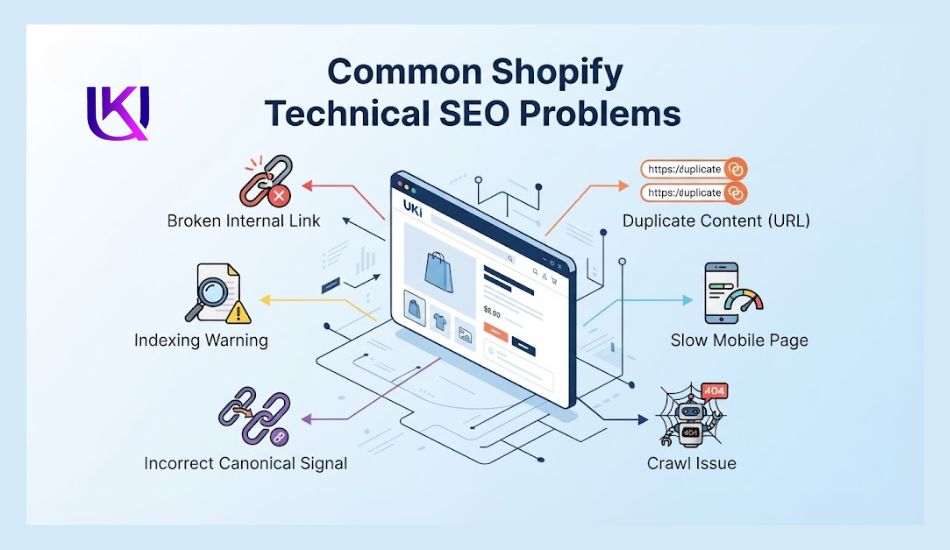
Common Shopify SEO Mistakes
1. Chasing Low-Quality Backlinks
Getting more backlinks is not always better. Buying links or collecting links from unrelated, low-quality websites can add little value to your SEO.
Focus on earning relevant links from websites that make sense for your industry, products, or audience. Relevance and trust matter more than simply increasing your backlink count.
2. Creating Duplicate Product Content
Many Shopify stores use the same product description across several products or copy descriptions from suppliers.
This gives search engines very little unique information to work with. Write useful product content that explains the product’s features, benefits, use cases, sizing, materials, and other details your customers need.
3. Ignoring Collection Pages
Store owners often focus on individual products and forget about collection pages.
A well-optimized collection page can target broader searches and help shoppers discover several related products. Give important collections a clear title, useful copy, strong internal links, and relevant products.
4. Creating Too Many Filter URLs
Product filters can make shopping easier, but they can also create many URL variations.
For example, filtering products by size, color, brand, or price may create URLs that do not need to appear in Google’s index. Review your filter setup and make sure search engines can focus on the URLs that have real search value.
5. Leaving Out-of-Stock Products Unmanaged
Deleting every product as soon as it goes out of stock can create unnecessary 404 errors and remove pages that may already have backlinks or search visibility.
If a product will return, keeping the page available with a clear out-of-stock message may make more sense. If it is permanently discontinued, consider redirecting the URL to a closely related product or category.
6. Overlooking Internal Links
A product page should not exist as an isolated URL.
Link related products, relevant collections, buying guides, and other useful pages where it makes sense. Good internal linking helps shoppers navigate your store and helps search engines discover important pages.
7. Writing for Search Engines Instead of Shoppers
Adding the same keyword again and again will not make a product page more useful.
Write naturally and answer the questions your customers have before buying. Explain what the product does, who it is for, how it is used, and why it may fit their needs.
8. Ignoring Mobile SEO
Most shoppers can access your store from a phone, so your mobile experience matters.
Check page loading, navigation, product images, buttons, menus, forms, and checkout usability on smaller screens. A page that works well on desktop but feels slow or difficult to use on mobile can lose both shoppers and engagement.
9. Forgetting Product Structured Data
Your product pages contain information such as price, availability, ratings, and product details.
Using appropriate Product structured data can help search engines understand this information. Check your implementation and test important product pages instead of assuming the markup is working correctly.
10. Publishing Content Without a Search Purpose
Adding blog posts every week does not automatically create organic growth.
Before publishing, identify the search problem the content will solve. A useful guide should support your products, answer customer questions, or target a relevant search topic. Then connect that content to the appropriate collection and product pages.
11. Treating SEO Traffic as the Only Goal
More organic traffic does not always mean more revenue.
Track what happens after a visitor reaches your store. Look at organic clicks, conversions, revenue, product performance, and landing pages.
Your goal is to attract shoppers who have a reason to buy, not simply increase the number of visits.
12. Making SEO Changes Without Checking the Data
Changing URLs, redirects, indexing settings, or large groups of product pages can affect your organic visibility.
Before and after major changes, use Google Search Console and your Shopify analytics data to monitor clicks, impressions, indexed pages, traffic, and conversions.
Small technical changes can have a large effect when they affect hundreds or thousands of URLs.
Conclusion: Build a Shopify Store Google Can Understand
Shopify SEO USA is not only about adding keywords to your product pages. You need a store that Google can crawl, understand, and index correctly.
Start with the technical foundation. Check your indexing, canonical URLs, XML sitemap, internal links, structured data, mobile performance, and Core Web Vitals. Then improve your product and collection pages based on what your US customers are searching for.
Use Google Search Console to find real search and indexing issues instead of guessing. Keep your product information clear, useful, and easy to trust.
When your technical SEO and content work together, you give Google clearer signals and give shoppers a better path from search to purchase.
If you are not sure why your Shopify store is losing organic visibility, a free SEO consultation can help you identify the technical issues and decide what to fix first.
Helpful article: E-Commerce SEO: How to Rank Your Product Pages on Google?

FAQs: What Does It Take to Build a Shopify SEO Strategy for the US Market?
1. How long does Shopify SEO take to show results?
Most US Shopify stores start seeing movement in rankings within eight to twelve weeks. Full results, especially for competitive keywords, often take four to six months.
2. Do I need an app for Shopify SEO?
No single app fixes everything. Apps can help with parts of the job, like image compression or schema markup, but the core fixes, like duplicate pages and site speed, need direct changes to your store.
3. Does Shopify hurt SEO compared to WordPress?
No. Shopify ships with clean code and fast servers by default. Most SEO problems come from theme choices, too many apps, or missed technical settings, not the platform itself.
4. Should I use Shopify’s built-in blog for SEO?
Yes. A blog helps you target searches your product pages cannot, like gift guides, comparison posts, and how-to content. It also gives you more pages that can link back to your products.
5. What is the biggest SEO mistake US Shopify store owners make?
Changing URLs or deleting old pages without setting up a redirect. This throws away rankings and links a page has already earned, sometimes overnight.
6. Is technical SEO worth the cost for a small store?
Yes, especially early on. Fixing a technical issue once often keeps paying off for years, unlike ads that stop working the moment you stop paying for them.
Ready to Fix Your Store’s SEO?
You just read more real, working fixes than most paid guides cover. But reading is easy. Fixing dozens of technical issues on your own store takes real time, and time is the one thing most store owners do not have.
If you want a second pair of expert eyes on your Shopify store, book a free consultation. We will look at your site, find the specific issues costing you traffic, and hand you a clear plan to fix them. No pressure, no obligation, just a real look at what is holding your store back.