

Ecommerce SEO product pages can bring you high-value traffic more than keywords. When your product pages are easy for both shoppers and Google to understand.
But if your products aren’t ranking, the problem may run deeper than adding keywords to product titles or descriptions.
You built a great product page. The photos look sharp. The price is fair. But Google still won’t show it.
This happens to many stores. Your product page sits on page five. Buyers never scroll that far. They buy from someone else instead.
The good news? You can fix this. Ecommerce SEO for product pages is not magic. Ecommerce is a set of clear steps. Each step fixes one real problem. Do them in order, and your pages start to move up.
This guide skips the fluff. No vague tips. Just the exact fixes that work on product pages right now.

What Actually Makes a Product Page Rank
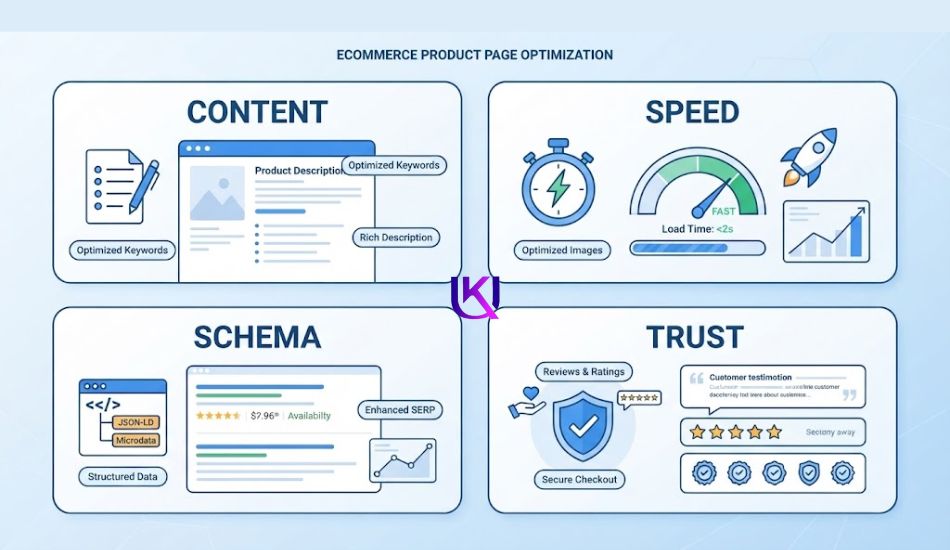
Google looks at four things on a product page:
- Real, useful content, not copied text
- Fast, stable pages, also called Core Web Vitals
- Clean structured data, also called schema
- Trust signals, like reviews and clear policies
Miss one, and your page struggles. Nail all four, and your page has a real shot, even in a busy niche. Pages that combine strong technical performance, clean structured data, buyer-focused content, and real trust signals tend to win. Pages that lean on just one of these fall short.
Let’s fix each one, step by step.
Problem One: Your Product Text Looks Like Everyone Else’s
Here is the biggest reason product pages don’t rank. The text on the page is copied.
Maybe you pasted the manufacturer’s description. Maybe five other stores sell the same item, with the same words. Google sees this. Google can’t tell which page is the “real” one. So it ranks none of them well.
When many pages share the same product text, Google struggles to pick a winner. Rankings can fall across every page that copied it.
The Fix
Write your own words for every product. You don’t need a novel. A short, honest paragraph is enough.
Answer one question: how does this product help the buyer? Not just what it is, but what it does for them.
Then add real customer reviews. Reviews add fresh words to the page. Real reviews bring new, honest text that search engines tend to value.
| Quick Win: Rewrite your top 10 best-selling product pages first. These pages get the most traffic. Better descriptions there bring the fastest results. |

Problem Two: Your Pages Load Too Slowly
Speed is not a “nice to have” anymore. It is graded, scored, and it shapes your rank.
Google grades speed using three tests, called Core Web Vitals. Google calls a page “good” when LCP stays at 2.5 seconds or under, INP stays at 200 milliseconds or under, and CLS stays at 0.1 or under.
| Metric | What It Measures | Good Score |
| LCP (Largest Contentful Paint) | How fast the main content loads | 2.5 seconds or less |
| INP (Interaction to Next Paint) | How fast the page reacts to a tap or click | 200 milliseconds or less |
| CLS (Cumulative Layout Shift) | How much the page jumps around while loading | 0.1 or less |
As of the latest Web Almanac data, only 48% of mobile pages and 56% of desktop pages meet all three targets. That means most of your competitors are already failing here. This is your opening.
Simple Fixes That Help Fast
- Compress every product photo before you upload it
- Load images only when the shopper scrolls to them
- Cut down extra scripts, like chat boxes, trackers, and pop-ups
- Keep your price and “Add to Cart” button in the same spot as the page loads
Speed doesn’t just help your rank. It helps your sales too. A one-second speed gain on mobile can lift conversion by about 7%.

Problem Three: Google Can’t Read Your Product Details
Structured data, often called schema, tells Google exactly what’s on your page. Price. Stock. Rating. Without it, Google has to guess.
Four schema types matter most for product pages: Product, Offer, AggregateRating, and FAQPage.
| Schema Type | What It Unlocks in Search |
| Product | Basic product identity: name, image, brand, description |
| Offer | Price, currency, and stock status shown right in the result |
| AggregateRating | Star ratings pulled from your real reviews |
| FAQPage | A chance to show up in AI answers and “People Also Ask” boxes |
Getting this right is about more than pretty search results. Your price and stock status need to match everywhere: on the page itself, in your schema, and at checkout.
| Watch Out: Never mark a sold-out item as “InStock” in your schema. Google checks this. A mismatch can hurt trust across your whole store. |
Test your schema before you publish it. Google’s free Rich Results Test tool will flag any missing or broken fields.

Problem Four: One Product, Ten Duplicate URLs
Does your product come in five colors? Three sizes? Each combination often creates its own web address. Now Google sees ten pages for one product.
This is called duplicate content, and it wastes your SEO power. Google splits its trust across all ten pages, instead of putting it all behind one strong page.
The Fix
Pick one main web address for each product. Point every color and size option back to it using a canonical tag. This tells Google, “This is the real page. Send your ranking power here.”
Do the same for filtered pages, like a page for “shoes under fifty dollars in black.” These rarely need to rank on their own.
Problem Five: Google Can’t Find Your Products Easily
If a product page needs many clicks to reach from your homepage, Google may skip it, or crawl it less often.
Ideally, no product should sit more than a few clicks away from its main category page.
- Link every product page from its category page
- Add breadcrumb navigation, and mark it with BreadcrumbList schema
- Keep your sitemap clean: list only the canonical pages you actually want ranked, nothing else.
Problem Six: What Happens When a Product Sells Out
Don’t just delete the page. That page may already carry links, reviews, and rank history.
- Still selling the item soon? Keep the page live. Update the schema to say “OutOfStock.” Show a “notify me” option.
- Never restocking? Redirect the page to the closest matching product, or to the category page.
- Discontinued for good, with no close match? Let the page return a proper “not found” response, so Google can drop it cleanly.

Getting Found in AI Search, Not Just Blue Links
Shoppers now see AI-written answers above the normal search results. These answers now show up on roughly 50 to 60% of US searches.
Ranking in normal search and getting picked by AI are two different games. Only about 38% of the pages that AI picks also rank in the top 10 normal results.
To get picked, your page needs to answer the shopper’s question directly, right on the page. Add a short FAQ section near the bottom. Use real questions your buyers actually ask. Mark this section with FAQPage schema.
| Pro Tip: Skip generic FAQs like “What is shipping?” Use specific ones tied to that exact product, like “Does this blender crush ice?” |

Your Product Page SEO Checklist
Print this. Check it off, page by page.
- Original product description, written for this one product
- At least 3 real customer reviews shown on the page
- LCP under 2.5 seconds on mobile
- Product, Offer, and AggregateRating schema added and tested
- Price and stock status match on the page, in the schema, and at checkout
- Variant URLs point to one canonical page
- Out-of-stock plan in place: keep, redirect, or remove
- Short FAQ section with FAQPage schema
Need Help Fixing This on Your Store?
Reading a checklist is easy. Auditing hundreds of product pages, fixing broken schema, and rebuilding your site speed takes real technical SEO work.
I’m UK Deb Professional SEO (Search Engine Optimization) Service, a technical SEO specialist. I help ecommerce stores fix exactly what’s covered in this guide, from Core Web Vitals to product schema to canonical cleanup. If your product pages deserve better rankings, let’s talk.
Final Ecommerce Product Page SEO Check
Before you publish or update a product page, run through this quick check.
1. Technical SEO
- Can Google crawl the page?
- Can the page be indexed?
- Does the URL work correctly?
- Is the canonical URL correct?
- Are important internal links in place?
2. Product information
- Is the product title clear?
- Does the description answer buyer questions?
- Are price and stock details accurate?
- Are product images clear and optimized?
- Are variants handled correctly?
3. Search visibility
- Is the page targeting the right search intent?
- Is product structured data implemented correctly?
- Is the page included in your XML sitemap when appropriate?
- Are unnecessary filter or duplicate URLs controlled?
4. User experience (UX Design) SEO Support
- Does the page work well on mobile?
- Does it load quickly?
- Can shoppers easily select options and add the product to their cart?
- Are shipping and return details easy to find?
- Does the page provide enough information to support a buying decision?
After publishing, monitor the page in Google Search Console and your store analytics.
Do not judge the page only by rankings. Watch impressions, clicks, conversions, and sales.
A product page is ready for SEO when Google can understand it, and customers can use it without confusion.
5. SEO Should Support Your Ecommerce Goals
Your product pages should not be optimized only to get more Google traffic.
They should help you get the right traffic and turn that traffic into customers.
Start with your most important products. Fix technical problems first, improve the product information, strengthen internal links, and make the buying experience simple.
Then measure what happens.
- If a product page gets impressions but few clicks, review its search result title and description.
- If it gets clicks but few sales, look at the product page, price, trust signals, shipping information, and buying process.
- If Google cannot index the page, fix the technical problem before spending time on more content.
This approach helps you connect SEO work with real ecommerce results.
You are not just trying to rank a product page.
You are building a product page that can be found, understood, trusted, and purchased from.
Explore Technical SEO Services at ukdeb.net →
Conclusion: Ecommerce SEO Product Pages: How to Rank on Google Steps
Ecommerce SEO product pages need more than keywords. Your pages should be easy for Google to crawl, understand, and index, and easy for shoppers to use.
Start with technical SEO, clear product information, structured data, strong internal links, fast mobile performance, and accurate product details.
Then use Google Search Console(GSC) and your store data to find problems and measure results.
You do not need to fix everything at once. Fix the biggest problems first, keep your product pages useful, and improve them as your store grows.
FAQs About Ecommerce SEO Product Pages
1. How long should a product description be?
Long enough to answer real buyer questions. That’s often 150 to 300 words. Short, thin pages tend to struggle. But padding with filler words hurts more than it helps.
2. Do I need schema on every single product page?
Yes, if you want rich results like star ratings and price shown in Google. It is one of the few technical fixes that directly changes how your listing looks in search.
3. Can I use the same description across similar products?
No. Even small changes matter. Swap in the real color, size, or use case for that exact product. Google treats near-copies almost the same as exact copies.
4. How often should I update product pages?
Check your top sellers every three months. Refresh outdated info, add new reviews, and confirm your schema still matches your current price and stock.
5. What is the most important ecommerce SEO product page tip?
Make the page useful for both Google and real shoppers. A strong product page should be technically accessible, clearly explain the product, answer buyer questions, build trust, and make purchasing easy.