

Business blog content planning can help you stop guessing what to publish and start creating posts with a clear purpose.
You write a blog post. You hit publish. Then you wait. Nothing happens.
A week later, you try again. New topic. New guess. Still quiet.
This is not your fault. Most small teams start this way. They write what comes to mind. But Google can’t read your mind. Your customers can’t either.
If your team keeps writing new articles but gets little traffic, few leads, or no clear business result, the problem may not be your writing. Your blog may lack a plan.
A useful blog strategy starts with what your customers need. You find the questions they search for, check the search intent behind those queries, and choose topics that match both their needs and your business goals.
The fix is a plan. Business blog content planning means you pick your topics before you write. You pick them for a reason. Each post gets a job. This guide shows you how, step by step.
Then you organize related topics into clusters, connect them with internal links, and guide readers to the right service or product page.
However, you will have a simple system. It helps people find you on Google. It brings in the right readers. And it helps those readers turn into leads.
Quick answer: Business blog content planning is the habit of choosing blog topics on purpose. You match each topic to a real search, a real customer question, and a real business goal. Then you put the topics on a calendar and check what works.
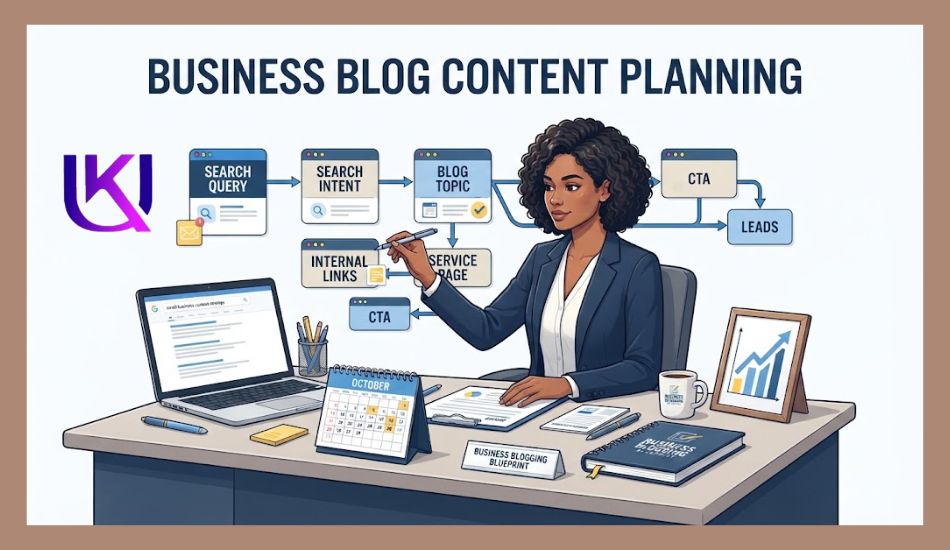
What Is Business Blog Content Planning?
Business blog content planning means deciding what to publish based on your audience, search demand, SEO goals, and business needs.
It is not just a list of blog titles.
You choose topics and information that answer real customer questions and connect to your products or services.
For example, if you offer website design, your topics could include:
- How much does a small business website cost?
- How do you choose a website platform?
- Why is your website slow?
- How can you improve website conversions?
- When should you redesign your website?
Each topic can target a different stage of the buyer journey. Some readers want information. Others are comparing solutions. Some are ready to hire a service.
What Should You Plan Before Writing?
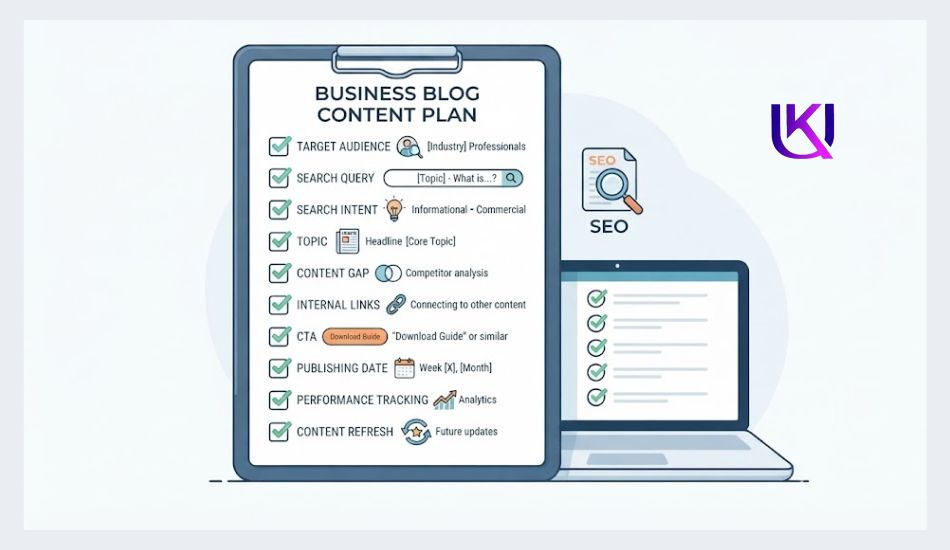
Before writing a post, define:
- Target reader: Who needs this information?
- Problem: What do they want to solve?
- Search query: What might they search on Google?
- Search intent: What do they want from the search?
- Topic: What useful answer will you provide?
- Internal links: Which related pages should you link to?
- CTA: What should the reader do next?
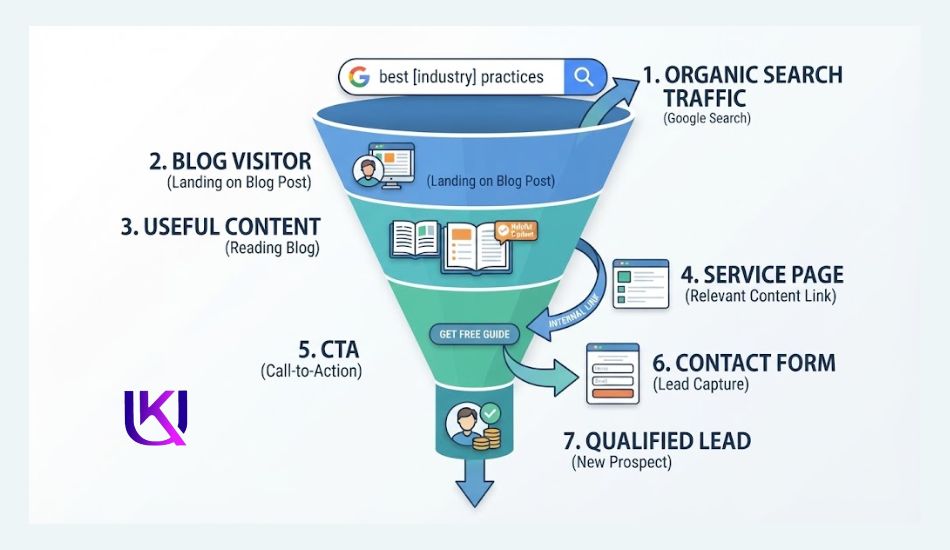
This creates a simple path:
Search query → Blog post → Related content → Service page → Lead
Your goal is not to publish more posts. Your goal is to publish the right posts for the right readers and business goals.
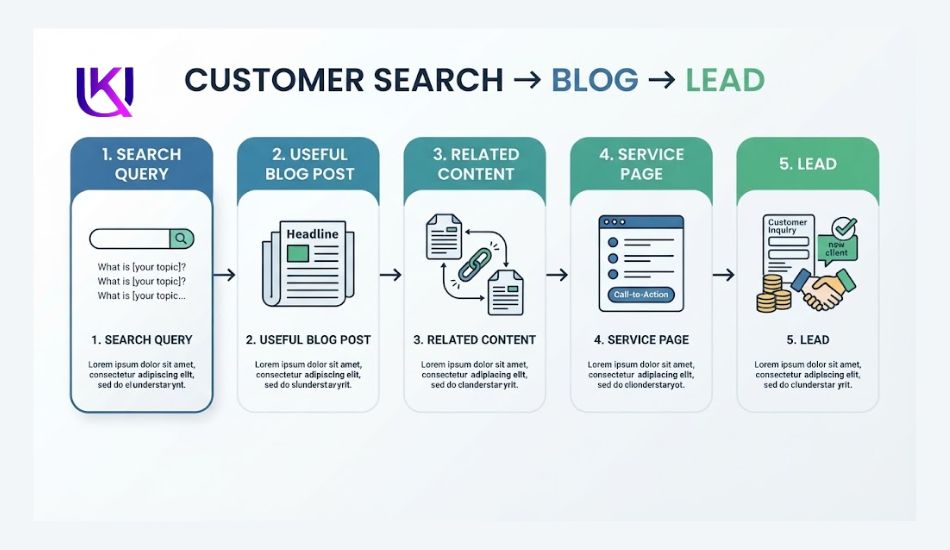
How to Plan Business Blog Posts for SEO, Traffic, and Leads
You can use tools such as Google Search Console and keyword research to find real search opportunities. You can also study competitor content to spot gaps your website has not covered.
From there, a simple content calendar can help your team decide what to publish, when to publish it, and what each post should achieve.
The goal is not to publish as many blog posts as possible. Your goal is to build useful content that earns search visibility, answers real questions, supports your SEO strategy, and gives the right reader a clear next step toward becoming a customer.
The 9 steps at a glance
- Pick one clear goal.
- Learn what your customers ask.
- Check your old posts.
- Find searches worth targeting.
- Group your topics into clusters.
- Find content gaps.
- Score your ideas.
- Build a simple calendar.
- Write a short brief for each post.
After that, you publish, track, and update. We will cover that too.
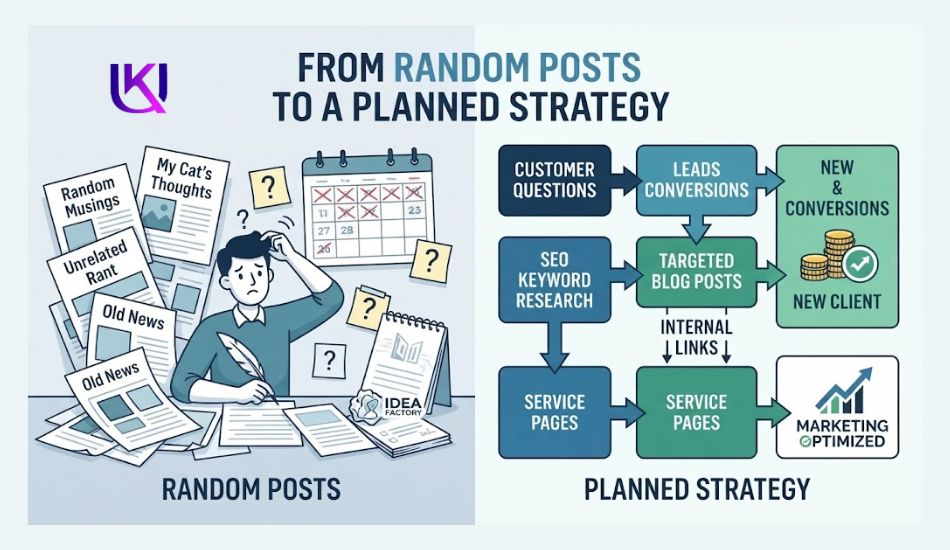
Why Do Random Blog Posts Often Fail?
Niche-relevant business topics need SEO expertise or brainstorming. Random posts feel busy. But busy is not the same as useful. Here is what goes wrong.
- Your posts fight each other: Two posts can chase the same search. Google may not know which one to show. SEO folks call this keyword cannibalization. It is a common reason pages get stuck.
- You attract the wrong readers: A post can bring many visitors who will never buy. One search guide warns that big traffic can bring almost no sales when readers only want to learn.
- Thin posts do not help: Google wants pages made for people. Its helpful content system now sits inside its main ranking systems. It works all the time. It is not just a one-time update.
A plan fixes all three. It gives each post one job.
Publishing blog posts without a plan can waste your time and budget. A post may get impressions but still bring no useful traffic or leads.
Common problems include:
- No clear audience: You write for everyone instead of a specific customer.
- No search intent: The post does not match what people want from the search.
- Weak topic choice: You choose topics with little value for your business.
- No service connection: The post gets traffic but does not lead readers to a relevant offer.
- Poor internal linking: Related pages are not connected.
- No clear CTA: Readers do not know what to do next.
- No performance review: You keep publishing without checking what works.
For example, a local SEO agency may publish a post about “SEO tips.” The topic is broad and may attract readers who are only looking for basic information.
A better topic could be “Local SEO Checklist for Small Businesses.” It targets a clear problem and can naturally link to the agency’s local SEO service.
Your blog should answer a useful search and support a clear business goal. That starts with planning your topics before you write.
What Business Blog Content Planning Really Means
Every content writing focus is on your business niche topic, relevant problem and solution, and what users need to know about your products or services. It is the work you do before you write. You decide what to post, who it is for, and why it matters. Then you put it in order.
Think of a trip map. Without one, you wander. With one, you know each turn.
A good plan answers six questions:
- What will we write?
- Who is it for?
- Which search does it match?
- What should the reader do next?
- Who writes it, and when?
- How will we know it worked?
| Plan or calendar? A calendar is a list of dates. A plan tells you why each date has that topic. Build the plan first. The calendar comes after. |
Step 1: Pick One Clear Goal
Start with the end. Ask this: What should my blog do for my business in the next 90 days? Pick one main goal.
- More calls from local customers
- More email sign-ups
- More demo or quote requests
- More people who know your name
One goal keeps you from chasing every shiny idea.
Here is an example. A small accounting firm wants more consultation requests. So its goal is not “more traffic.” Its goal is “more calls from small shop owners.” That one choice shapes every topic that follows.
Step 2: Learn What Your Customers Ask
Your customers already tell you what to write. You need to listen. Look here:
- Sales calls and emails
- Chat messages and social media comments
- Reviews, yours and your rivals’
- Questions your team answers every week
Write down the exact words people use. Do not fix them. Say a customer asks about “tax stuff for my shop.” That may be the very phrase they type into Google.
Next, list five to ten problems your buyers face. HubSpot suggests the same start. Each problem can grow into a group of posts.
This step also builds Experience, the first “E” in E-E-A-T. Real questions lead to real answers. And real answers beat general tips.
Step 3: Check What You Already Have
Before you add new posts, look at the old ones. You may already own a few winners.
Make a simple sheet. List each post with its link, topic, date, and visits. Then mark every post with one word:
- Keep: It works. Leave it alone.
- Update: The topic is right, but the facts are old.
- Merge: Two posts cover one topic. Join them.
- Delete: It is thin and has no use.
This costs less than writing from zero. Google Search Console is free. It shows which searches already bring people to your site.
Step 4: Find Searches Worth Targeting
Start with real searches
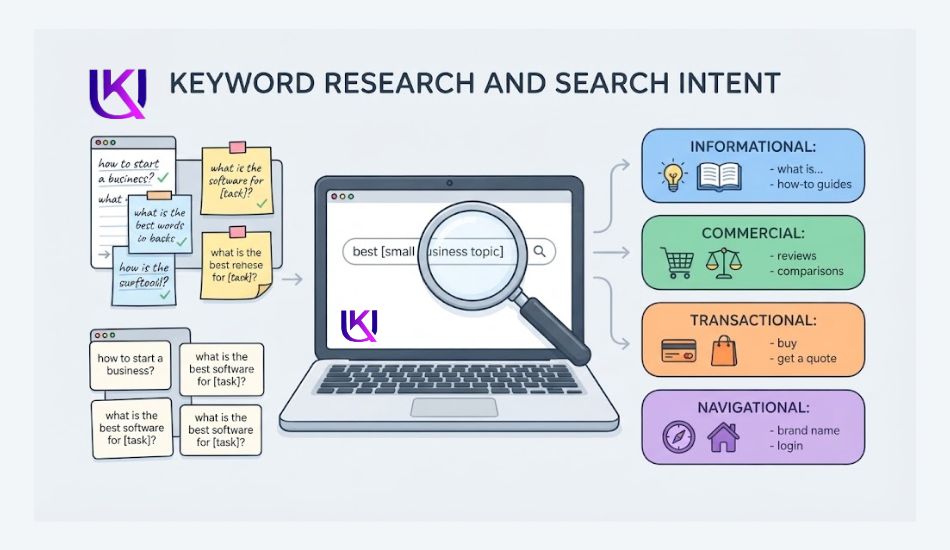
Open Google. Type your topic. Look at three things: the drop-down suggestions, the “People Also Ask” box, and the related searches at the bottom.
Then use a keyword tool. Google Keyword Planner is free. Semrush and Ahrefs cost money. For each search, check three things. How many people look for it? How hard is it to rank? Does it fit your business?
Go small first. A new blog rarely beats giant sites on big topics. One content coach gives a good example. A search like “small business tax planning” is a smarter pick than the huge term “tax planning.” It is narrower. You can actually win it.
Match the search intent
Search intent means why a person typed those words. There are four kinds. Two matter most for a business blog.
| Intent | What the reader wants | Example search | Best post type |
| Informational | To learn something | how to plan blog posts | How-to guide, explainer, FAQ |
| Commercial investigation | To compare before they choose | Best content planning tools | Comparison, review, case study |
| Transactional | To act now | Hire SEO content writer | Service page, contact page |
| Navigational | To reach one site | ukdeb.net blog | Your own home or brand page |
How do you check intent? It takes two minutes:
- Search the phrase on Google.
- Look at the top five results.
- Blog posts and guides? The intent is informational. Lists and “best” or “vs” pages? It is commercial.
- See a People Also Ask box? That usually points to informational intent.
- Make your post match what you see. Do not fight Google’s view of the search.
Your own search shows both sides. People who type this topic mostly want to learn how. But some also want to compare tools or hire help. That is why this guide teaches first and then helps you choose.
Step 5: Group Your Topics Into Clusters
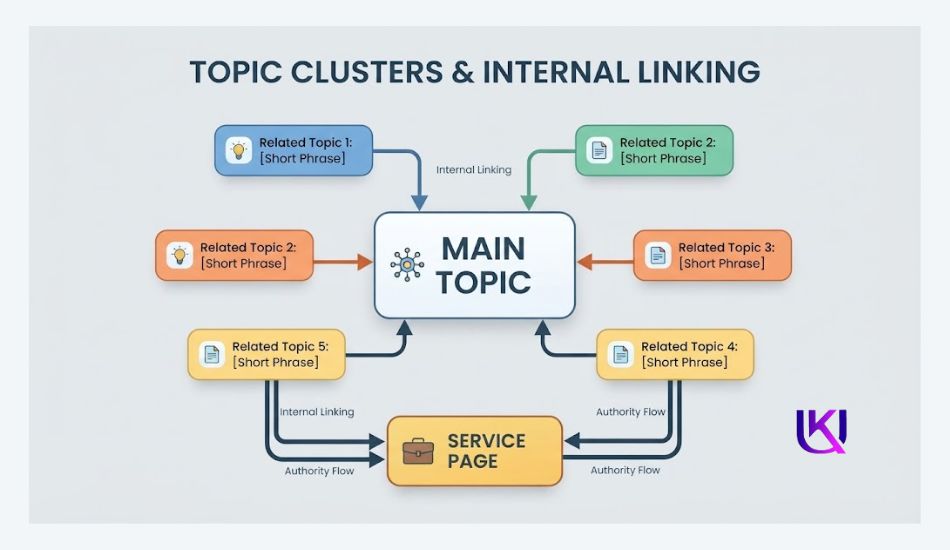
Now group your ideas. Picture a tree. The trunk is one big guide. It is called a pillar. The branches are smaller posts. They are called cluster posts. Each branch links to the trunk. The trunk links back to each branch.
This helps readers move from post to post. It also shows Google that you cover the topic in depth.
Start with one cluster of five to seven posts. Do not start five clusters at once. A small team will burn out.
Use one rule: one search need, one page. If two posts answer the same question, merge them.
Here is a sample cluster for that accounting firm:
Pillar: The Small Business Bookkeeping Guide
- How to track business expenses
- Bookkeeping mistakes to avoid
- Xero vs QuickBooks for small shops
- Do you need an accountant?
- How one shop cleaned up its books (case study)
Step 6: Find Content Gaps
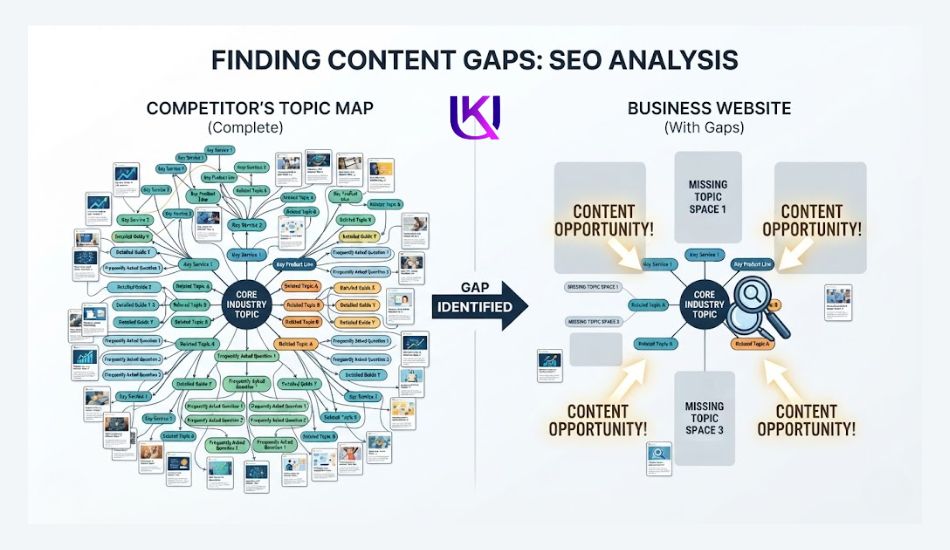
A content gap is a unique idea for questions people ask that no page answers well. Gaps are where small blogs win. Here are four ways to find them:
- Read the top five pages: Note what all of them skip. Then add it to your post.
- Check People Also Ask: Does your post answer each question? If not, add a short section.
- Study your rivals: List topics they cover that you do not. Tools like Semrush SEO Tool have gap reports.
- Use your customer list: Questions from Step 2 that nobody answers online are golden tips.
| Gaps in this very topic: Many guides on this topic teach calendars and stop there. This guide fills four gaps they skip: How to tie each post to a lead, not just a visit; how to choose between many ideas (Step 7); how to show real experience in every post; what to do after you publish |
Step 7: Score Your Ideas
You will have more ideas than time. So score them. Give each idea one to three points in each column. Three is best. Add them up. Write the high scores first.
- Search demand: Do people look for it?
- Business fit: Does it lead to something you sell?
- Win chance: Can you beat what ranks now?
- Real proof: Can you share first-hand know-how?
Here are sample scores. Your numbers will differ.
| Idea | Demand | Fit | Win chance | Proof | Total |
| How to track business expenses | 3 | 2 | 3 | 3 | 11 |
| Xero vs QuickBooks for small shops | 2 | 3 | 2 | 3 | 10 |
| What is a bookkeeping system? | 3 | 2 | 1 | 2 | 8 |
Step 8: Build a Simple Calendar
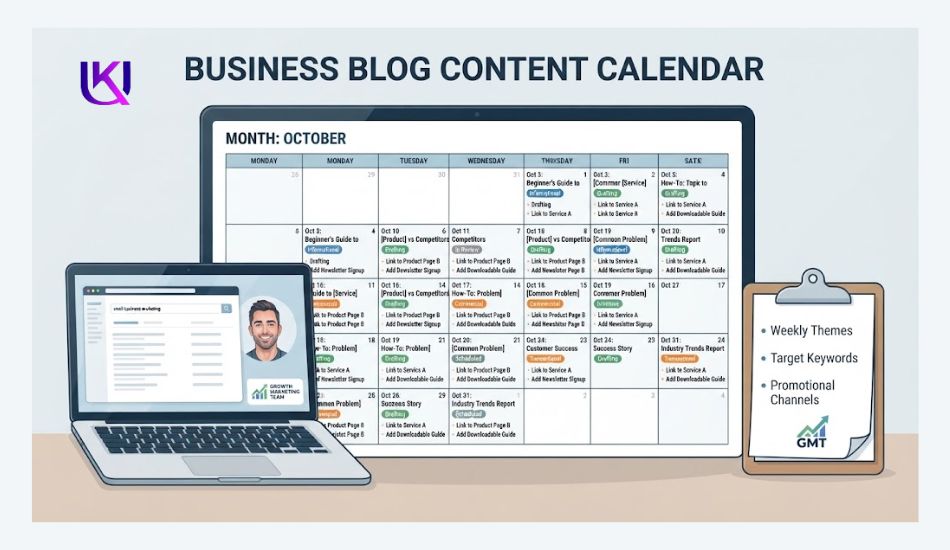
Now put the winners on a calendar. Plan one quarter at a time. Twelve to sixteen posts is easy to plan and easy to share with your team. A list of one hundred ideas only brings stress.
Pick a pace you can keep. One strong post every two weeks beats four rushed posts and then silence.
Many experts publish the pillar first and the supporting posts next. Here is a sample plan:
| Week | Topic | Main keyword | Intent | Reader’s next step |
| 1 | The Small Business Bookkeeping Guide | small business bookkeeping | Informational | Free checklist |
| 2 | How to Track Business Expenses | track business expenses | Informational | Read the full guide |
| 4 | Bookkeeping Mistakes to Avoid | bookkeeping mistakes | Informational | Free checklist |
| 6 | Xero vs QuickBooks for Small Shops | xero vs quickbooks | Commercial | Book a call |
| 8 | Do You Need an Accountant? | hire an accountant | Commercial | Book a call |
| 10 | How One Shop Cleaned Up Its Books | bookkeeping cleanup | Commercial | Book a call |
Review the plan every quarter. Add fresh keyword research. Drop ideas that no longer fit.
Step 9: Write a Short Brief for Each Post
A brief is a one-page note for the writer. Even if the writer is you. It should have:
- The main keyword and the search intent
- Who the reader is and what they want to know
- The questions to answer (use People Also Ask)
- Where you can add real proof
- Which posts to link to
- The one next step for the reader
- The due date and the owner
Briefs save hours. They stop the “what was this post even for?” problem.
How to Show Real Experience in Every Post
Google tells site owners to make helpful, people-first content. It uses E-E-A-T to describe what that looks like. Google says showing these signs is one of many factors. It is not a magic switch. Links, site health, and topic depth matter too.
| Letter | Plain meaning | How to show it in a post |
| Experience | You have done this yourself | Share real examples, photos, and results from your work |
| Expertise | You know the topic well | Explain steps clearly. Add an author name and short bio |
| Authoritativeness | Others see you as a go-to source | Link to trusted sources. Show clients, awards, or mentions |
| Trust | Readers can count on you | Be accurate. Show the update date. Make contact details easy to find |
What about AI help and AI search?
Google does not ban AI-assisted writing. It judges the page, not the tool. But pages made in bulk just to game search can break its spam rules. So add your own experience. Check every fact. Edit by hand.
Google’s guidance for AI Overviews says there is no special markup and no separate AI index. The same quality signals apply. So write a clear answer near the top. Use plain headings. Back up your claims.
How to Turn Blog Readers Into Leads
Traffic is nice. Leads pay the bills. Match the next step to the reader’s intent.
- Readers who are learning: Offer a soft step. A checklist, a template, or an email list works well.
- Readers who are comparing: Offer proof. A case study, a comparison page, or a free call fits here.
- Ready readers: Send them to a service page or a contact form.
A few simple rules help:
- Use one main call to action per post.
- Place it after you have helped the reader.
- Put proof near the button, like a short result or review.
- Link to your service page only where it truly fits.
Do not push a sale on a beginner. It breaks trust fast.
Track, Learn, and Update
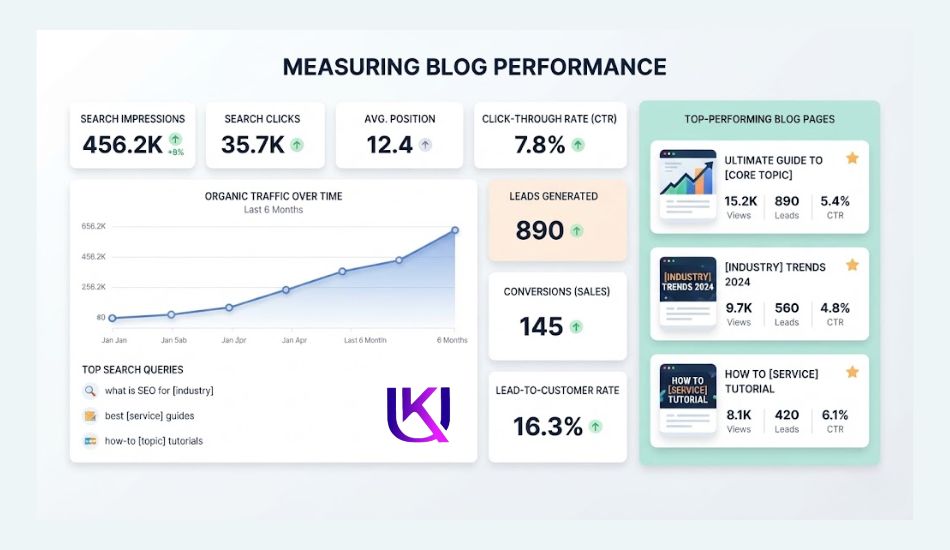
Publishing is not the finish line. Use Google Search Console for clicks and searches. Use Google Analytics to see leads. Check once a month.
- Many views, few clicks? Rewrite the title and description.
- Many clicks, few leads? Improve the offer or the button.
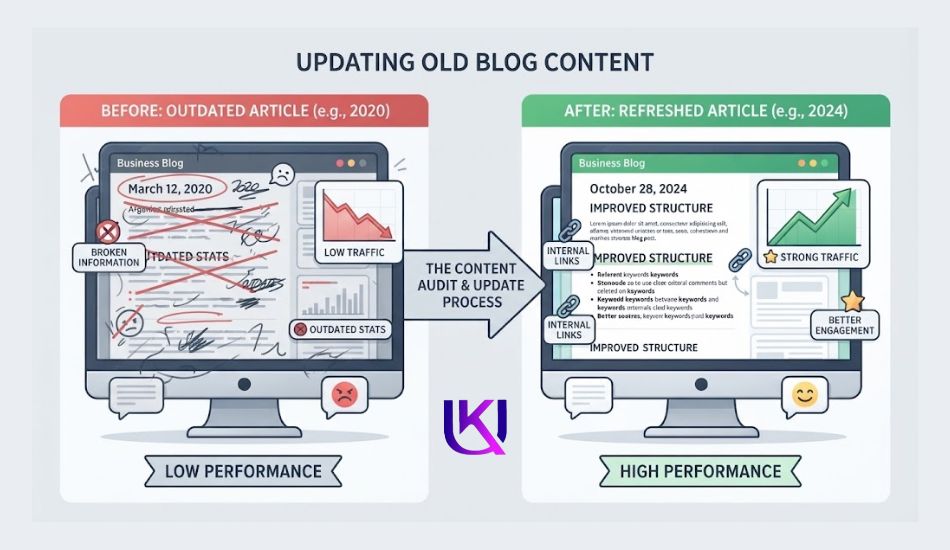
- Traffic falling? Update the post with fresh facts.
- Is a post rising? Link to it from your other posts.
Look at old posts every six to twelve months. Check the intent again. Search results change. A term that once showed guides may now show comparison pages.
Common Business Blog Planning Mistakes
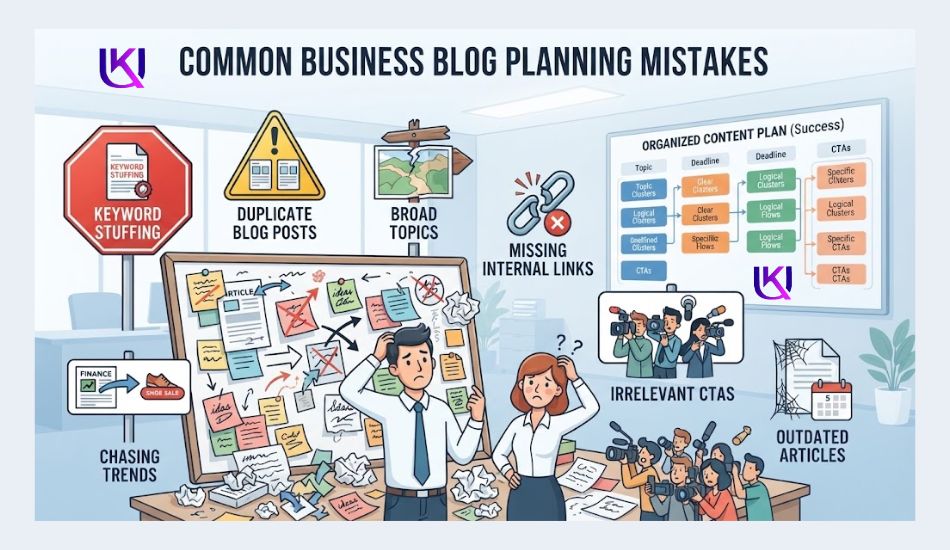
Poor planning can make your blog harder to rank and less useful for your business. Watch for these common mistakes.
1. Writing Only for Keywords: Do not create a post just because a keyword has search volume. Start with the reader’s problem and search intent. Use the keyword naturally where it helps explain the topic.
2. Choosing Topics With No Business Connection: A topic may bring traffic but still have little value for your business. Choose subjects that relate to your products, services, expertise, or customer problems.
3. Ignoring Search Intent: A keyword does not tell you everything. Check what users expect when they search. If most results are guides, do not create a sales page and expect it to meet the same intent.
4. Creating Duplicate Posts: Writing several posts about the same topic can split your content and create confusion. Check your existing articles before adding a new one. Update or improve an existing page when it already covers the topic.
5. Publishing Without Internal Links: Connect related blog posts with relevant internal links. Link supporting articles to important pages, including your main topic pages and relevant service pages.
6. Writing Very Broad Topics: Broad topics often make it hard to give a useful answer. Narrow the topic around a specific problem, audience, or search query.
7. Chasing Every Trend: Not every trending topic fits your audience or business. Choose trends only when they have a clear connection to your customers and your content strategy.
8. Measuring Only Traffic: Traffic does not tell you whether your blog helps the business. Also check impressions, clicks, search queries, leads, conversions, and the pages that assist those actions.
9. Never Updating Old Content: Old posts can lose value when information, search results, products, or customer needs change. Review important posts and update them when needed.
10. Using CTAs That Do Not Match Search Intent: Your CTA should fit the reader’s next step. Someone looking for basic information may need another helpful guide, while someone comparing services may be ready for a consultation or service page.
A strong blog plan avoids these mistakes by connecting search demand, user intent, useful content, internal links, and business goals.
Common Mistakes to Avoid Checklist
- Posting with no goal
- Chasing huge keywords a new blog cannot win
- Writing two posts for the same search
- Skipping internal links between related posts
- Writing from guesses instead of real customer questions
- Ignoring commercial searches, so no one ever reaches your offer
- Publishing and forgetting
DIY, Freelancer, or Agency: Which Fits You?
You can build this plan alone. Or you can get help. Here is a fair look at each way.
| Option | Best for | Cost | Your time | Watch out for |
| Do it yourself | Tight budgets. Owners who like to learn | Low | High | Easy to stall after a few weeks |
| Freelance SEO writer | Small teams that need a plan and steady posts | Medium | Medium | Ask for real samples in your niche |
| Agency | Larger teams that need many services | High | Low to medium | Can feel generic if they do not know your trade |
Conclusion: How Do You Turn Random Blog Posts Into an SEO Strategy?
Business blog content planning helps you stop publishing random posts and start building content with a clear purpose.
Start with your customers. Find the problems they search for, match each topic to search intent, and connect useful posts to your products or services.
Use internal links to build topic connections and clear CTAs to guide readers to the next step.
Then measure what happens. Check search queries, clicks, organic traffic, leads, and conversions. Update posts when they become outdated or stop meeting user needs.
You do not need hundreds of blog posts. You need the right topics, clear goals, useful answers, and a plan you can maintain.
Helpful article: How to Start a WordPress Blog That Actually Makes Money in 2026?
FAQs: Why Does Your Business Blog Need a Content Plan?
1. What is business blog content planning?
It is choosing your blog topics on purpose before you write. Each topic matches a real search, a customer question, and a business goal. You then order the topics in a calendar and track the results.
2. How many blog posts should a small business publish?
There is no magic number. Pick a pace you can keep. One good post every two weeks is a fine start. Some teams plan twelve to sixteen posts per quarter. Quality matters more than speed.
3. How do I choose blog topics for SEO?
Start with customer questions. Check each one on Google. Look at search demand, intent, and how hard it is to rank. Then score your ideas and write the best ones first.
4. What is a content gap?
It is a question people ask that no page answers well. You find gaps by reading top results, checking People Also Ask, and comparing your site with rivals.
5. How long until blog posts bring traffic?
It often takes months. The time depends on your site’s age, the topic, and the rivals. Smaller, specific searches tend to show results sooner than big ones.
6. Do I need a content calendar?
Yes, but the plan comes first. A calendar only lists dates. A plan explains why each topic is there and what the post should do.
7. Will Google punish AI-written blog posts?
Google looks at quality, not the tool. Helpful pages can rank. Pages mass-made to game search can break its spam rules. Add real experience and check your facts.
Your Next Step
Do not try all nine steps today. Start small. Do Step 1 and Step 2. Pick your goal. List ten customer questions. That is enough for now. Next week, do Step 3.
A plan will not bring results overnight. But it makes each post a step toward something. That is the whole point.
| Want a plan built for your business? UK Deb helps businesses build SEO content strategies, run SEO audits, and plan blog posts that bring traffic and leads. Visit ukdeb.net to start. |
Sources Used for Research;
Check Google Search Central for Google’s own wording before you act on any of this.
- Layer3 Labs, Google’s AI Content Guidelines Explained (2026): layer3labs.io/guides/google-ai-content-guidelines
- Stackmatix, Google Search Central’s AI Overviews Guidance: stackmatix.com/blog/google-search-central-ai-overviews-guidance
- Spark Blog, People-First Content: Passing Google’s Helpful Content Standards: sparkblog.dev/blogs/people-first-content
- Hobo Web, The Google Helpful Content Update and Its Relevance in 2026: hobo-web.co.uk/the-google-helpful-content-update-and-its-relevance-in-2026
- HubSpot, The Future of Content Strategy: blog.hubspot.com/marketing/content-marketing-strategy
- Kalungi, 7 Tips to Organize Your Topic Cluster Strategy: kalungi.com/blog/topic-cluster-keyword-research-organization-tips
- Nightwatch, Keyword Clustering: nightwatch.io/blog/keyword-clustering
- Amelie Pollak, Blog Topic Cluster Planning: ameliepollak.com/blog/blog-topic-cluster-planning-strategy
- RNK Rocket, How to Create a Content Calendar for SEO: rnkrocket.com/blog/content-calendar-seo
- Workspace, SEO Content Plan Guide: workspacein.com/blog/seo/content-plan-guide
- Webtonic, Search Intent Types: webtonic.io/blog/search-intent-types
- Respona, Search Intent in SEO: respona.com/blog/search-intent
- Indexed, Search Intent Types in SEO: joinindexed.com/blog/search-intent-in-seo-how-to-match-content-to-what-users-actually-want