
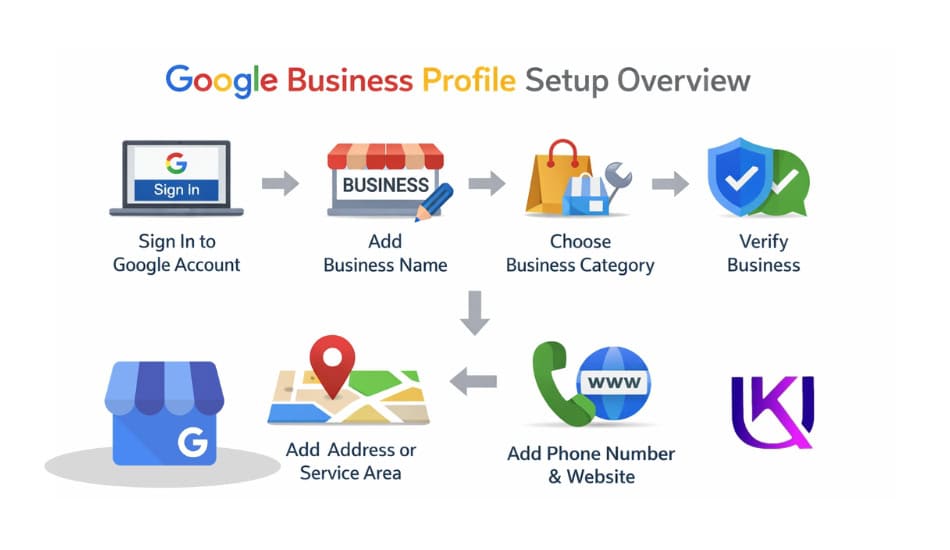
The only Google My Business setup guide you need to get found locally in the USA
Google My Business setup USA can help your local business show up when people search on Google. If customers cannot find you on Google Search or Google Maps, they may choose a competitor instead. This is a common problem for many small businesses across the United States.
A Google Business Profile (GBP) gives customers the information they need to contact you. They can see your business name, address, phone number, website, business hours, and service area in one place. This free business listing can help more people discover your company and trust your brand.
Right now, over 97% of people search online before they walk into a local business. And Google sends most of that traffic through one place, the local map pack. The three businesses you see at the top of that map? They all have a verified and optimized GBP.
The setup process is simple. You only need a Google Account, your business details, and a way to verify that you own the business. Once your profile is verified, you can manage your listing, improve your local SEO, and increase your visibility in local search results.
Your neighbor opens Google and types “best plumber near me.” Three businesses show up. Yours is not one of them.
That is the exact moment a Google Business Profile (formerly Google My Business) could have changed everything for you.
This guide walks you through every single step of the Google My Business setup process in the USA. You will learn how to create your profile, verify it, fill it out the right way, and start showing up when local customers search for what you offer.
No tech skills needed. Just follow the steps.

What Is Google Business Profile (GBP) and Why Does It Matter?
Google Business Profile (GBP) is a free tool from Google. It lets you control how your business shows up on Google Search and Google Maps.
When someone searches for your business name, a box appears on the right side of the screen. That is your Business Profile. It shows your hours, phone number, reviews, photos, website, and more.
When someone searches for a type of business near them, like “pizza near me” or “auto repair in Austin,” Google shows a local map pack. Those top three results come from Google Business Profiles.
| Why You Cannot Afford to Skip This |
| Businesses with a complete profile get 7x as many clicks as those with an empty one. |
| Google Maps gets over 1 billion users every month. |
| A verified profile builds customers’ trust in Google-verified businesses more. |
| It is completely free to set up and use. |
| It directly impacts how high you rank in local search results. |
The old name was Google My Business. In 2021, Google rebranded it to Google Business Profile(GBP). You may still see both names used online. They are the same thing.
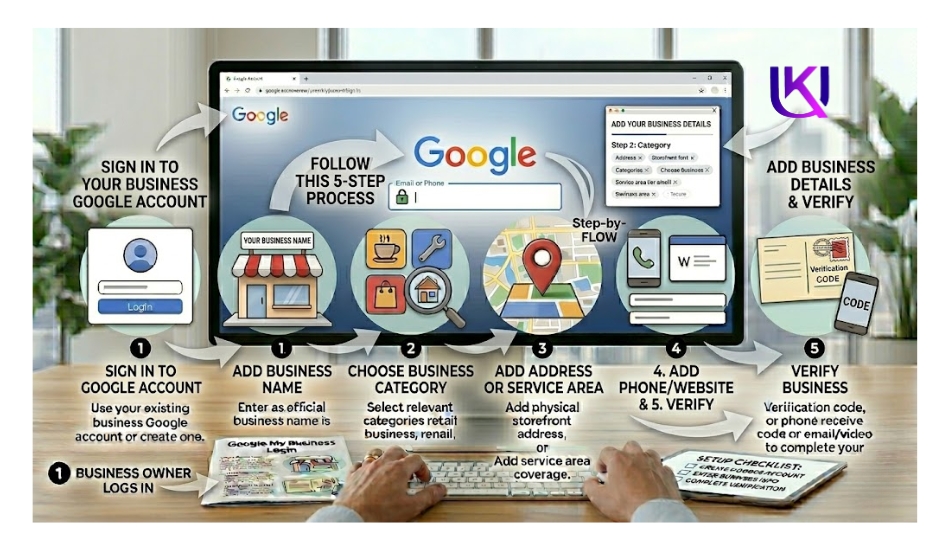
Step-by-Step: Google My Business Setup USA
How to create a Google Business Profile (GBP), complete business verification, choose the right business category, keep your NAP(Name, Address, Phone Number) information consistent, and set up your profile the right way from the start. Follow these steps in order. Do not skip any. Each step builds on the last.
Step 1: Sign In to Your Google Account
You need a Google account before you do anything else. If you already use Gmail, you have one. Use that.
If you do not have a Google account yet, go to accounts.google.com and create one. Use your business email if you have it. This keeps things professional and clean.
Once you are signed in, go to business.google.com. This is the official Google Business Profile manager page.
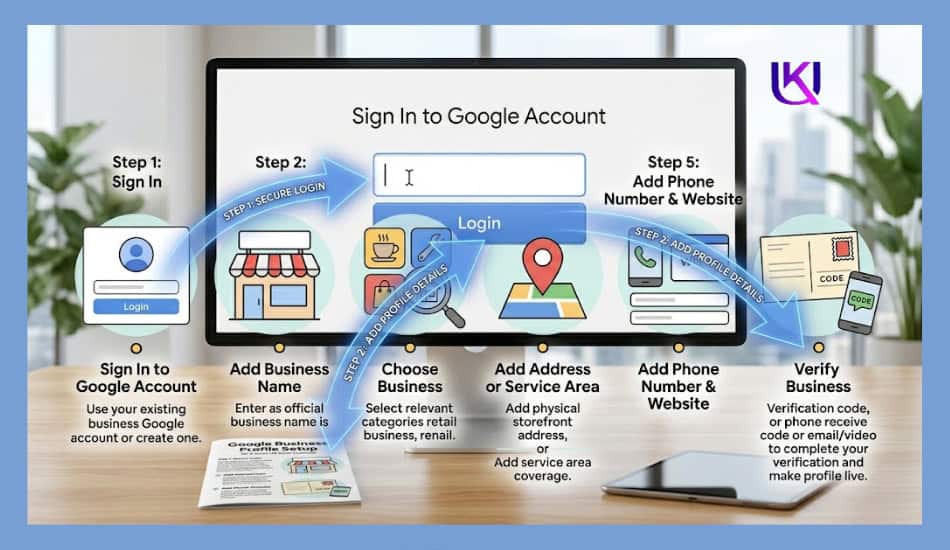
Step 2: Search for Your Business
On the Google Business Profile page, you will see a search box. Type your business name into it.
Google will check if your business already has a listing. This happens more than people think. A customer may have already added your business to Google Maps.
If your business appears in the results, click it. You will then go through a process to claim it.
If nothing shows up, click “Add your business to Google.” You will then create a brand new listing from scratch.
| Quick Tip: Google My Business Setup USA |
| Always search for your business first before creating a new one. |
| Duplicate listings can hurt your local SEO rankings. |
| If you find a duplicate, request to merge them through Google support. |
Step 3: Enter Your Business Name
Type your business name exactly as it appears in real life. Use the same name that is on your storefront, business cards, and website.
Do not stuff keywords into your business name. Do not write “Joe’s Pizza – Best Pizza in Chicago.” Google sees this as spam. Just write “Joe’s Pizza.” Google understands what you do from your category and description.
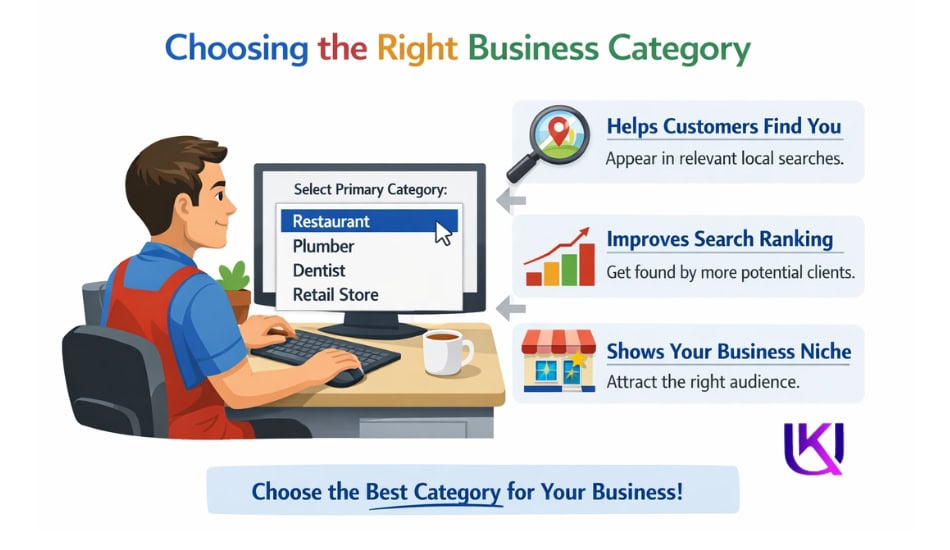
Step 4: Choose Your Business Category
This is one of the most important steps. Your category tells Google what type of business you are. It controls which searches you show up in.
Start typing your main service. Google will show you a list of matching categories. Pick the one that best describes your primary service.
For example: Google My Business Setup USA
- A hair salon should pick “Hair Salon,” not “Beauty Salon”
- A Mexican restaurant should pick “Mexican Restaurant,” not just “Restaurant”
- A plumber should pick “Plumber,” not “Contractor”
The more specific, the better. You can add extra categories later. But your primary category carries the most weight in local search.

Step 5: Add Your Business Location
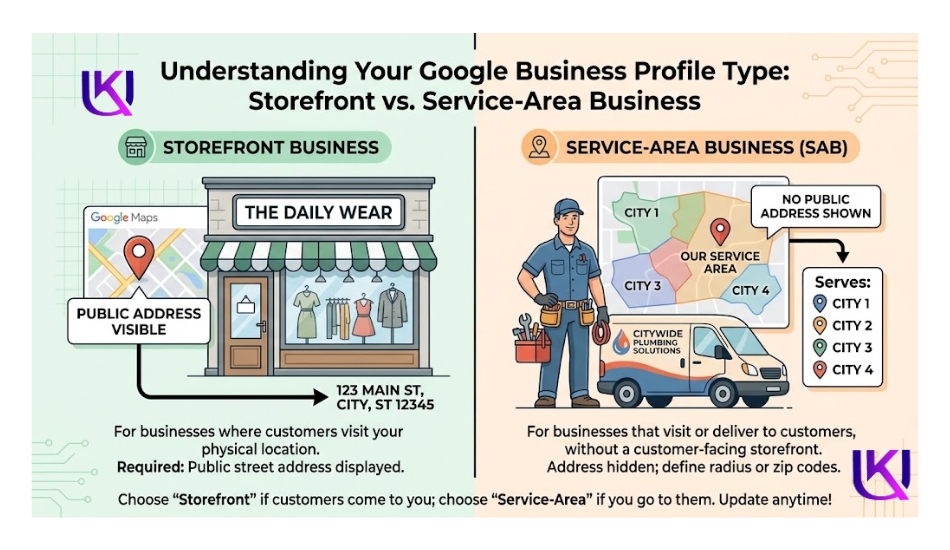
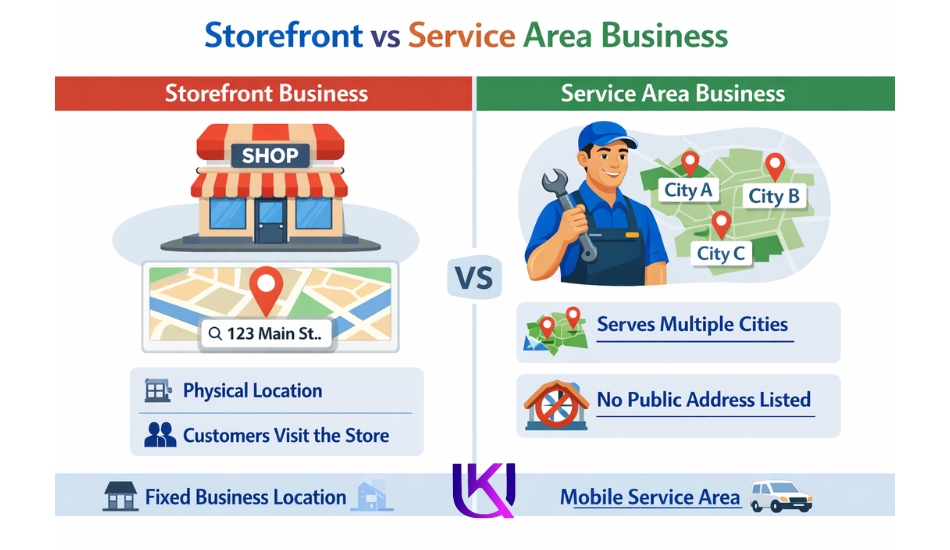
Google will ask if you want to add a physical location that customers can visit.
If you have a storefront, office, or shop, say yes. Enter your full address. Make sure this matches what is on your website and other online directories exactly. Even small differences, like “St.” vs. “Street,” can confuse Google.
If you work from home and do not want your home address to be public, you can hide your address. You will still appear in search results based on your service area.
Step 6: Set Your Service Area
This applies if you go to customers rather than if customers come to you. A plumber, electrician, dog groomer, or cleaning service would use this.
You can add cities, counties, zip codes, or states. Google will use these to show your profile to people searching in those areas.
You can have both a physical address and a service area at the same time. A restaurant might serve food in-house but also deliver to nearby areas.
Step 7: Add Your Phone Number and Website
Enter your local business phone number. Not a toll-free number. Not a call-tracking number from a third-party service (unless you know what you are doing). A real, local US phone number builds more trust and relevance with Google.
Add your website URL. If you do not have a website yet, you can skip this for now and come back later. But having a website that matches your Google profile information greatly improves your local rankings.
Step 8: Verify Your Business
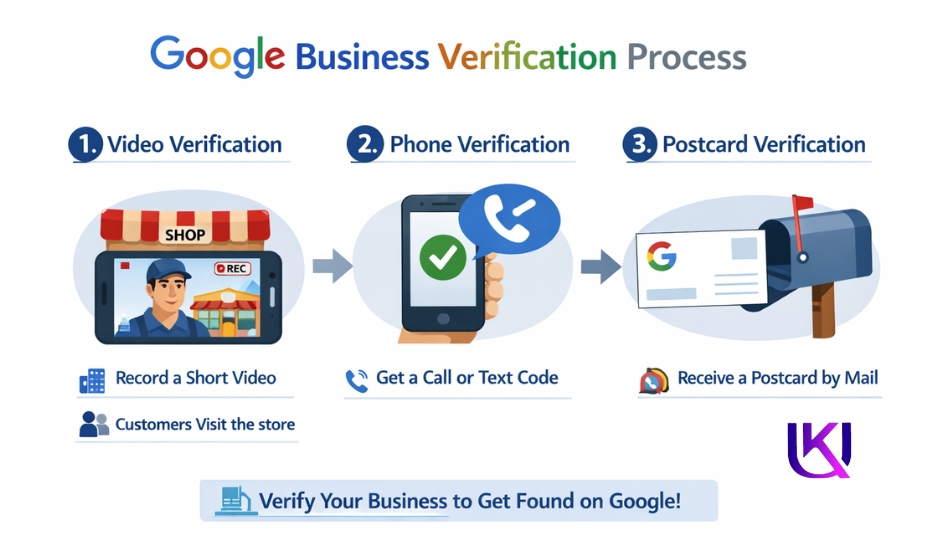
This is the most important step. Without verification, your profile will not show up on Google.
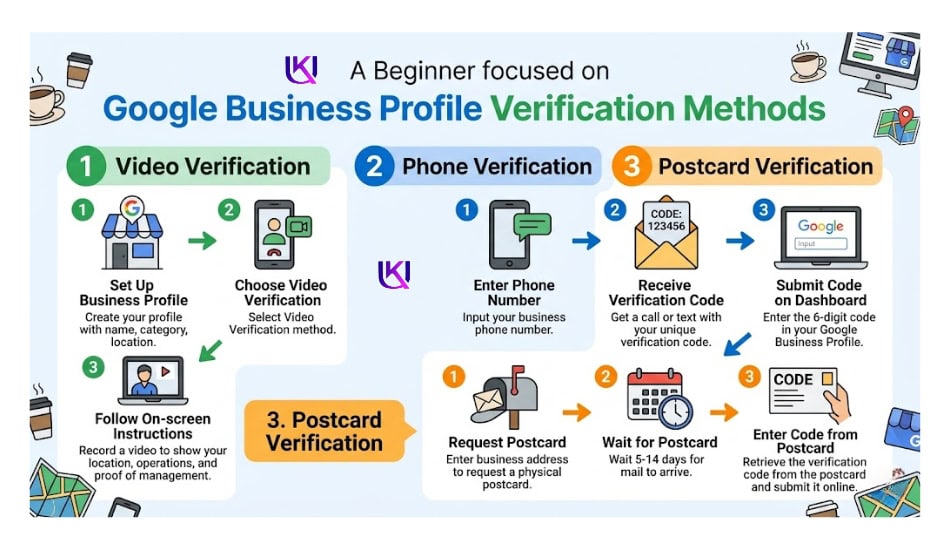
Verification proves to Google that you actually own the business at the address you listed. Google offers several ways to verify:
| Verification Method: Google My Business Setup USA | What to Expect: Google My Business Setup USA |
| Postcard by Mail | Google sends a postcard to your address. It arrives in 5-14 days. It has a 5-digit code. Enter the code in your profile to verify. |
| Phone Call or Text | Google calls or texts your business phone number with a code. Enter it to verify. Available for some accounts. |
| Email Verification | Google sends a code to your business email. Available only for some business types. |
| Video Verification | You record a short video showing your storefront, equipment, or location. Google reviews it manually. |
| Instant Verification | If your business is already verified in Google Search Console, you may get instant verification. |
| Live Video Call | A Google representative joins a video call to verify your location in real time. Available for select accounts. |
The postcard method is the most common. It takes the longest, but it works for every type of business. While you wait for the postcard, you can still fill in your profile. You cannot publish it until verification is complete.
How to Fill Out Your Google Business Profile the Right Way?
Verification is step one. Now comes the work that actually gets you ranked.
Think of your profile like a storefront window. The more information you put in and the more accurate it is, the more likely Google is to show it to people who are looking for you.
1. Write a Strong Business Description
You get 750 characters. Use them well.
Start with what you do and who you help. Add your main location. Mention a couple of things that make you different. Do not use this space to stuff keywords.
Bad example: “Best plumber in Dallas. Plumbing services Dallas, TX. Dallas plumber near me.“
Good example: “ABC Plumbing has served the Dallas-Fort Worth area since 2009. We fix leaks, install water heaters, and handle emergency repairs for homeowners and small businesses. Available 7 days a week.“
The good example tells a story. It mentions a real location, a real service, and builds trust. That is what Google rewards.
2. Set Your Business Hours
Enter your actual hours. If you are closed on Sundays, say so. If you have holiday hours, update them before the holiday.
Wrong hours are one of the most common reasons customers leave bad reviews. Someone shows up during your listed hours and finds you closed. That is a one-star review waiting to happen.
Google also has a feature for special hours. Use it for holidays, vacations, or any day you are closed outside your normal schedule.
3. Add High-Quality Photos
Businesses with photos get 42% more direction requests and 35% more website clicks than those without.
Here is what to upload: Google My Business Setup USA
- A cover photo that shows your storefront or workspace clearly
- Your business logo (keeps your profile looking professional)
- Interior photos showing what your space looks like inside
- Photos of your team working (builds trust and personality)
- Photos of your products or completed work
- Before-and-after photos if you do renovations, repairs, or makeovers
Use real photos taken with a decent camera or modern smartphone. Avoid stock photos. Google can detect them, and customers distrust them.
Aim for at least 10 photos when you first set up. Add more over time.
4. Add Your Products and Services
This is a feature many businesses miss completely. You can add individual services or products with names, descriptions, and prices.
Why does this matter? When someone searches for a specific service like “crown installation near me,” Google can match their search to your listed services. This gives you a better chance of showing up even when your category alone would not rank you.
For each service, write a short, clear description. You do not need a price if your pricing varies. Just leave it out.
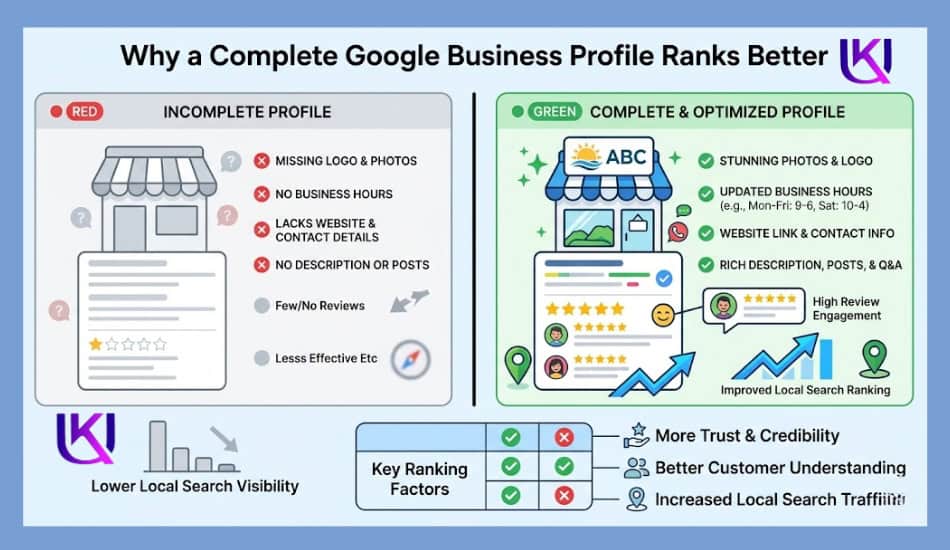
Complete Google My Business setup USA Checklist
| Task | Google My Business Setup USA Done? | Why GBP Setup USA Matters? |
| Business name added (no keyword stuffing) | [ ] | Spam names get suspended by Google |
| Primary category selected | [ ] | Controls which searches you appear in |
| Secondary categories added | [ ] | Expands your search visibility |
| Full address entered correctly | [ ] | Must match all other online listings |
| Service area defined | [ ] | Required for service-area businesses |
| Local phone number added | [ ] | Builds trust and local relevance |
| Website URL added | [ ] | Drives traffic and confirms legitimacy |
| Business verified | [ ] | Without this, your profile stays hidden |
| Business description written | [ ] | Helps Google understand what you do |
| Accurate hours set | [ ] | Reduces poor customer experiences |
| Cover photo and logo uploaded | [ ] | Makes profile look trustworthy |
| 10+ photos added | [ ] | Gets more clicks and direction requests |
| Services or products listed | [ ] | Ranks you for specific service searches |
| Business attributes selected | [ ] | Helps with filtered local searches |
| First post published | [ ] | The profile is active and managed |
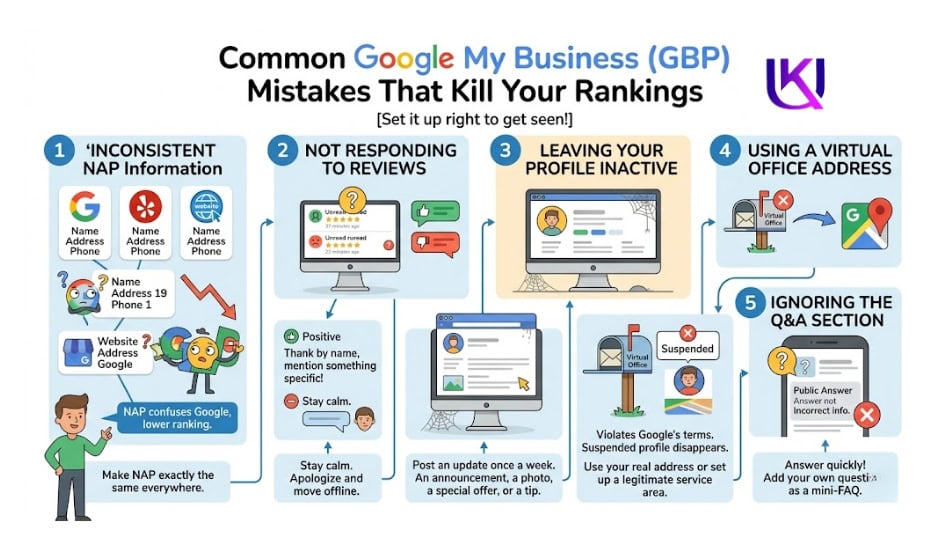
Common Google My Business (GBP) Mistakes That Kill Your Rankings
Setting up your profile is one thing. Google My Business setup in the USA is another. Here are the mistakes that hurt local businesses the most.
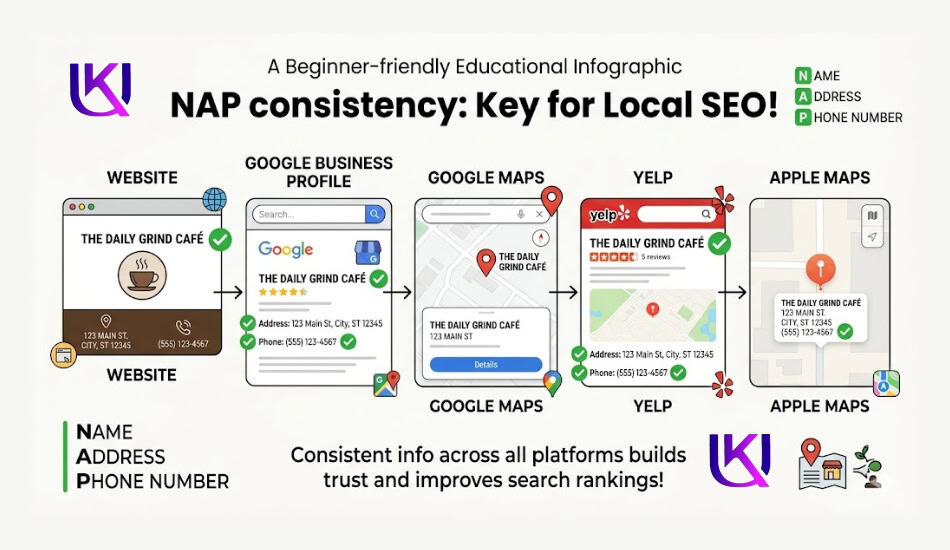
Mistake 1: Inconsistent NAP Information
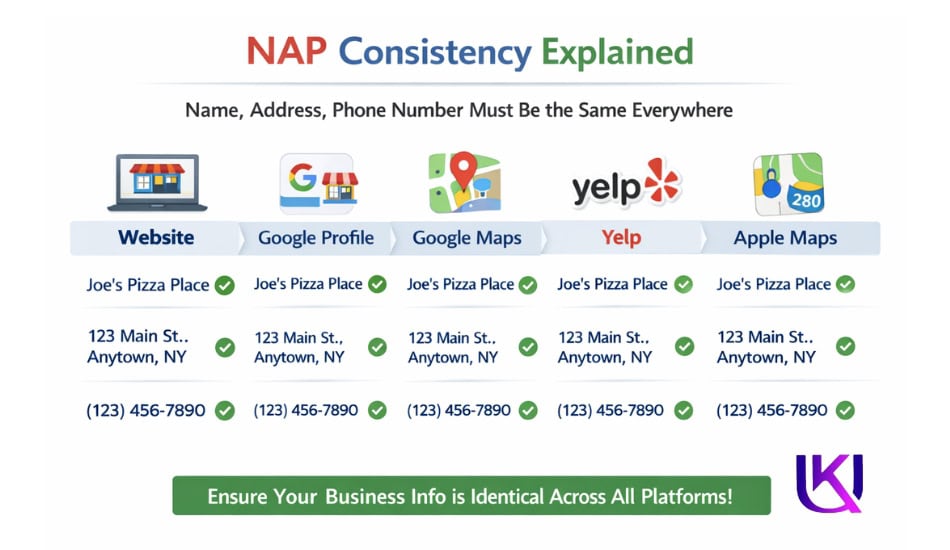
NAP stands for Name, Address, and Phone Number. Google cross-checks your Business Profile information with other websites that mention your business, like Yelp, the Better Business Bureau, local directories, and your own website.
If the information does not match, Google gets confused. It is less likely to show your profile in search results.
How to Fix It?: Make sure your business name, address, and phone number are the same everywhere online. If you moved or changed your number, update every listing.
Mistake 2: Not Responding to Reviews
Every review you get, good or bad, is a chance to show Google and your future customers that you care.
When you respond to reviews, it signals to Google that your profile is active and managed. Profiles that are engaged rank higher than those that are ignored.
- For positive reviews: Thank the person by name and mention something specific they said.
- For negative reviews: Stay calm. Apologize for their experience. Offer to fix it offline. Never argue publicly.
Mistake 3: Leaving Your Profile Inactive
Google rewards fresh, active profiles. If you set up your profile and then never touch it again, Google will rank you lower over time.
The fix is simple: Post an update once a week. It can be a short announcement, a photo, a special offer, or a tip. Just stay active.
Mistake 4: Using a Virtual Office Address
Some businesses try to game the system by using a virtual office or mailbox service as their address. This violates Google’s terms of service.
If Google finds out, and they often do, they will suspend your profile. A suspended profile disappears from search entirely.
Use your real business address or set up a legitimate service area without a public address.
Mistake 5: Ignoring the Q&A Section
Your profile has a public Q&A section. Anyone can ask a question. Anyone can answer it, including people who do not work for you.
Watch this section closely. Answer questions yourself before someone else gives the wrong answer. You can also add your own questions and answer them. Think of it as a free mini-FAQ.
What to Do After You Set Up Your Google Business Profile (GBP)?
Your profile is live. Verified. Filled out. What now?
1. Start Asking for Reviews
Reviews are the single most powerful thing you can do to improve your local rankings after setup.
Ask every happy customer to leave a Google review. Make it easy for them. Send a direct link to your review page via text or email. The more recent and positive reviews you have, the higher Google ranks you.
Never pay for reviews. Never ask friends and family to fake them. Google detects patterns and will remove fake reviews or suspend your account.
2. Use Google Posts Every Week
Google Posts are short updates that appear directly on your Business Profile. Use them to announce sales, events, new services, or news.
Each post lasts about 7 days. After that, it expires. So post regularly. Profiles that post consistently show Google that the business is active, and active profiles rank better.
3. Track Your Insights
Google gives you free analytics inside your Business Profile. You can see:
- How many people searched for your business
- What keywords do they use to find you
- How many people clicked to call you
- How many people asked for directions
- How many people visited your website from your profile
Check these numbers once a month. If your profile views are going down, that is a sign that something needs updating. If direction requests spike after you add new photos, that tells you photos are working.
4. Keep Your Information Updated: Google My Business Setup USA
Your profile is not a one-time thing. Your hours change. You add new services. You move. You get a new phone number.
Every time something about your business changes, update your profile that same day. Old information not only confuses customers, but it also hurts your Google rankings.
Is Google Business Profile Worth It in 2026?
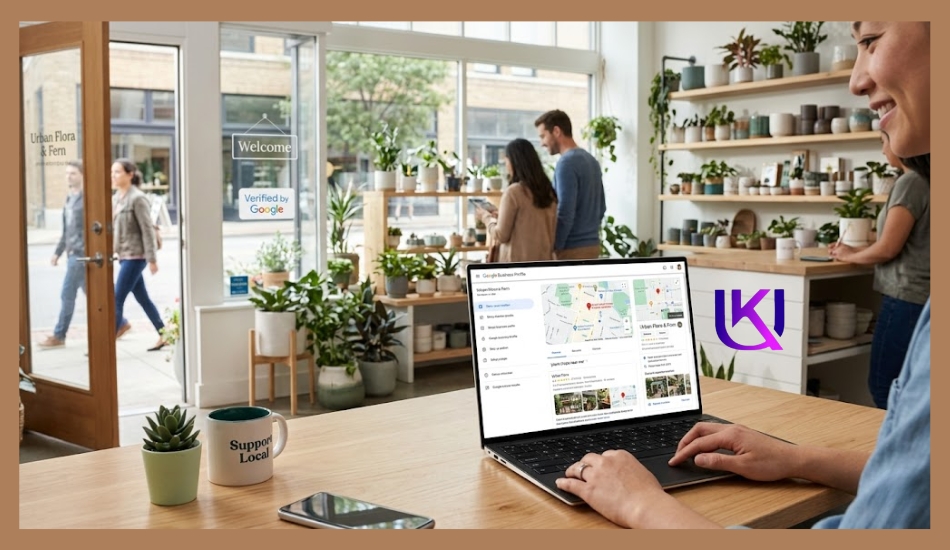
Yes, Google Business Profile (GBP) is still one of the best free marketing tools for local businesses in 2026. If you want more local customers to find your business online, it is hard to ignore. A complete profile can help you appear in local search results, Google Maps, and mobile searches when people are looking for products or services near them.
1. Local Search Trends Continue to Grow
More people now search online before they visit a business. They look for nearby restaurants, plumbers, dentists, stores, and service providers every day. When someone searches for a local service, Google often shows Business Profiles before regular website results.
If your profile is complete and active, you have a better chance of appearing where customers are already looking.
2. Better Visibility on Google Maps
Google Maps has become a major source of local traffic. Many customers use Maps to find directions, business hours, phone numbers, and reviews before making a decision.
A verified Google Business Profile helps your business appear on Google Maps. This makes it easier for nearby customers to discover your location and contact you.
3. Mobile Searches Drive Local Customers
Most local searches now happen on mobile devices. People search while traveling, shopping, working, or looking for a quick solution nearby.
For example, a person may search for “coffee shop near me” or “emergency plumber near me” from their phone. If your Google Business Profile is optimized, your business can appear at the exact moment they need help.
4. Customer Trust Signals Matter More Than Ever
People want proof that a business is real and reliable. Your Google Business Profile provides important trust signals such as:
- Customer reviews
- Star ratings
- Business photos
- Verified business information
- Updated business hours
- Contact details
When customers see accurate information and positive reviews, they are more likely to call, visit, or make a purchase.
5. Strong Impact on Local SEO
Google Business Profile remains a key part of local SEO. It helps Google understand who you are, what services you offer, and where you serve customers.
A complete profile with the correct business category, service area, phone number, website URL, and consistent NAP information can improve your local search visibility. It can also help you appear in Google’s Local Pack, which is one of the most valuable spots in search results.
However, if you run a local business in the United States, Google Business Profile is absolutely worth it in 2026. It is free, easy to manage, and can help you attract more local customers through Google Search and Google Maps. For many businesses, it is one of the simplest ways to improve online visibility and grow local sales.
Here is my real example: UK Deb Professional SEO Service and Business Consultancy.
Final Summary: Your Google My Business Setup USA Roadmap.
| What You Did? | What does it get you? |
| Created and verified your profile | Your business appears on Google Search and Maps |
| Added complete business information | Google trusts your profile and ranks it higher |
| Uploaded photos | More clicks, more direction requests, more trust |
| List your services and products | You show up for specific service searches |
| Set up review management | Higher rankings, more credibility, more customers |
| Committed to weekly posts | Active signal to Google, ongoing visibility boost |
Google Business Profile (GBP) is the most powerful free marketing tool available to local US businesses. It costs nothing to set up. It takes a few hours to do well. And it keeps working for you every single day, bringing in customers who are already looking for exactly what you offer.
You do not need to be a tech wizard. You do not need to spend money. You need to follow the steps, stay consistent, and treat your profile like the front door of your business because online, that is exactly what it is.
Helpful article: What Is SEO? The Simplest Guide for Total Beginners
FAQs: How to Create a Google Business Profile in the USA for Free?
1. How long does Google My Business verification take?
The postcard verification method takes 5 to 14 days. Some businesses qualify for faster methods like phone, email, or video verification. After you enter your verification code, your profile goes live within a few hours.
2. Can I set up Google My Business without a physical address?
Yes. If you serve customers at their location, you can hide your address and define a service area instead. Google will still show your profile in search results for the areas you cover.
3. Is Google Business Profile free?
Yes, it is completely free to create, verify, and manage a Google Business Profile (GBP). Google does offer paid advertising through Google Ads, but the Business Profile itself costs nothing.
4. What is the difference between Google My Business and Google Business Profile?
They are the same product. Google rebranded Google My Business to Google Business Profile(GBP) in 2021. If you see either name, they refer to the same free tool.
5. How do I rank higher in Google Maps?
Three main factors affect your local ranking: relevance (how well your profile matches the search), distance (how close you are to the searcher), and prominence (how well-known and reviewed your business is). A complete, active, and well-reviewed profile helps with all three.
6. Can I manage multiple locations on one Google Business Profile(GBP) account?
Yes. You can add multiple business locations under one account. For businesses with 10 or more locations, Google offers bulk upload options to manage them all at once.