
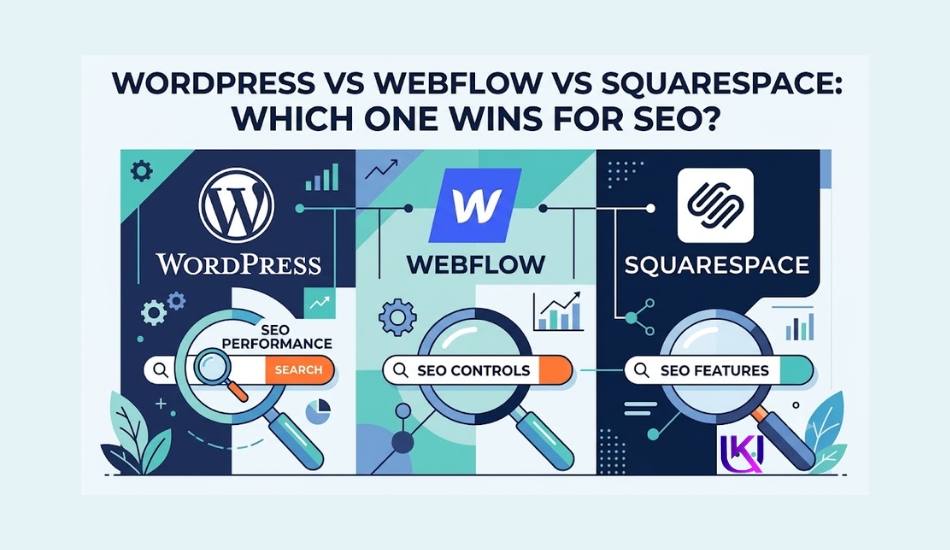
WordPress vs Webflow vs Squarespace SEO is a big question when you want a website that can rank on Google. That much is clear. What is not clear is which platform gets you there faster: WordPress, Webflow, or Squarespace.
Every platform seller will tell you their tool wins. Ignore that noise for a minute. This guide looks at what each platform actually does under the hood and then tells you which one fits your business, budget, and growth plan.
You may also wonder if Squarespace is a good choice. Picking the wrong platform can make SEO harder, limit your website’s growth, or cost you more later.
All three platforms can appear in Google Search. But they do not give you the same level of SEO control.
Things like page speed, mobile-friendly design, Core Web Vitals, URL structure, XML sitemaps, schema markup, internal links, and website performance all play a part.
WordPress uses SEO plugins like Rank Math and Yoast SEO for more control. Webflow includes many built-in SEO tools. Squarespace keeps SEO simple, but it has fewer options for advanced changes.
In this guide, you will see how WordPress, Webflow, and Squarespace compare for SEO, website management, customization, performance, pricing, and long-term growth.
You will know which platform fits your goals and helps you build a website that is ready to grow with your business.
Short answer first. Then the full picture.
| Quick Answer: WordPress vs Webflow vs Squarespace SEO SEO Is More Than Content. Your Website Platform Matters Too.WordPress wins on raw SEO power and control, especially past 1,000 pages. Webflow wins on clean code and fast pages right out of the box. Squarespace wins on simplicity, for a small, local business site. The right pick depends on how big your site will get, not which tool feels nicest today. |

Why Your Three Website Platforms Matter: One SEO Winner.
The website platform you choose does more than help you build pages. Search Engine Optimization (SEO) also affects how easily Google can find, understand, and rank your content. A platform with strong SEO features saves you time and gives you more ways to improve your website as it grows.
If your website is slow, hard for Google bots to crawl, or missing important basic SEO settings, even great content may struggle to rank. That is why choosing the right platform is one of the first SEO decisions you should make.
Also, if you run a small business, an online store, a blog, or a service website, your platform should help you create a fast, secure, and user-friendly experience for both visitors and search engines.
How Does Google See Your Website?
Google does not rank a website because of its name or the platform it uses. Instead, Google looks at how well your website performs and gives people helpful information.
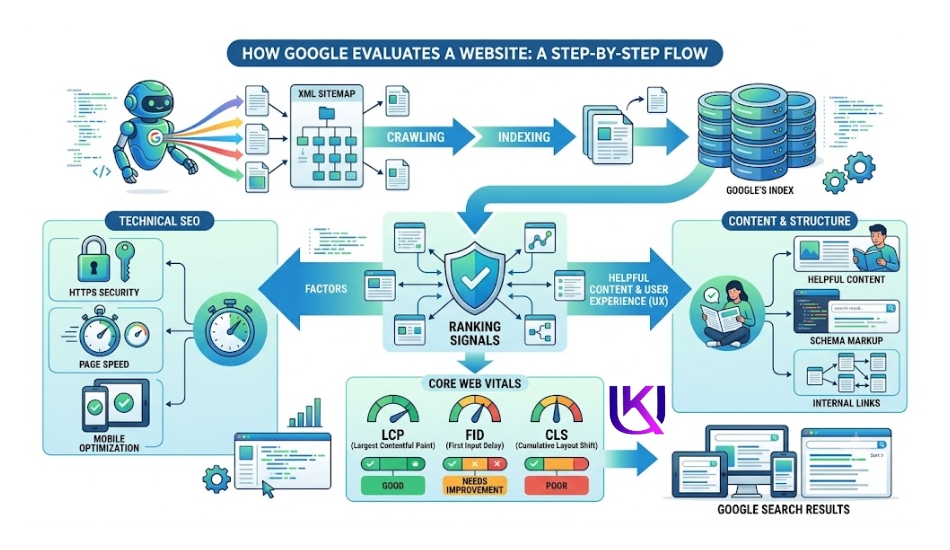
When Google visits your website, it checks many things, including:
- How fast your pages load
- Whether your website works well on mobile devices
- Clear URL structure
- Easy site navigation
- Internal links between pages
- XML sitemap
- Robots.txt file
- Meta titles and meta descriptions
- Schema markup
- Secure HTTPS connection
- Core Web Vitals
- Helpful, original content
A good website platform makes these SEO tasks easier to manage. It also helps Google crawl and index your pages without unnecessary problems.
Why Platform Choice Can Affect Rankings
Not every website platform gives you the same level of SEO control. Some are built for beginners and keep everything simple. Others give you advanced tools to improve technical SEO and grow your website over time.
Here is how your platform can affect SEO:
- SEO settings: You should be able to edit title tags, meta descriptions, URLs, image alt text, and canonical tags.
- Website speed: Fast-loading pages improve user experience and support better rankings.
- Mobile performance: Most Google searches happen on mobile devices, so your website should work smoothly on every screen size.
- Customization: As your business grows, you may need custom code, advanced schema markup, redirects, or extra SEO tools.
- Scalability: A platform should handle more pages, blog posts, products, and traffic without slowing down.
The right platform will not automatically put your website at the top of Google. However, it removes many technical barriers and gives you a stronger foundation for long-term SEO success.
WordPress and SEO Overview: Choose Your Platform, Shape Your Rankings.
WordPress is the most popular content management system (CMS) in the world. Millions of businesses, bloggers, and online stores use it because it gives them full control over their websites and SEO.
Unlike many website builders, WordPress is open source. That means you can customize almost every part of your site. You can improve page speed, organize your content, add schema markup, manage redirects, and install SEO plugins that help your pages perform better in Google Search.
WordPress does not guarantee higher rankings on its own. However, it gives you the tools and flexibility to follow SEO best practices as your website grows.
1. Strengths of WordPress SEO Strategy
WordPress stands out because it gives you more SEO control than most website platforms. Some of its biggest strengths include:
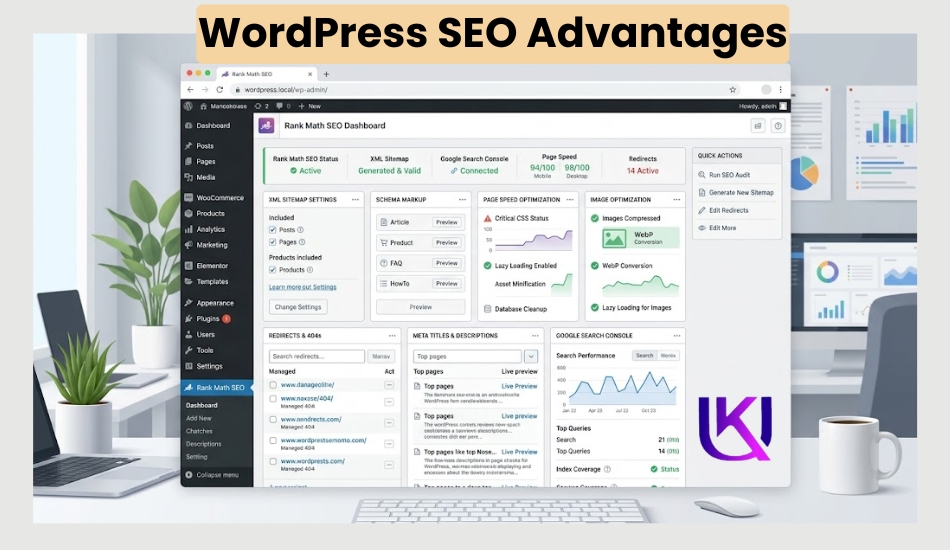
- Complete SEO control: Edit meta titles, meta descriptions, URL slugs, canonical tags, robots.txt, and XML sitemaps with ease.
- Powerful SEO plugins: Tools like Rank Math and Yoast SEO help you optimize pages, add schema markup, create XML sitemaps, and improve on-page SEO.
- Fast website performance: Choose quality hosting, enable caching, use a CDN, compress images, and improve Core Web Vitals.
- Flexible design: Thousands of themes and page builders, such as Elementor and Gutenberg, let you build almost any type of website.
- Easy content management: Publish blog posts, service pages, landing pages, and product pages without coding.
- Scalable for growth: If you have 20 pages or 20,000, WordPress can grow with your business organically.
- Strong ecommerce support: WooCommerce makes it easy to build an SEO-friendly online store.
- Large community: You can find tutorials, developers, plugins, and support for almost every SEO or website need.
These features make WordPress a strong choice for businesses that want long-term organic traffic and full control over their SEO strategy.
2. Weaknesses for WordPress Performance
WordPress is powerful, but it also comes with responsibilities.
Some common challenges include:
- You must choose reliable hosting for good speed and uptime.
- Themes and plugins need regular updates.
- Too many plugins can slow down your website if they are poorly built.
- Beginners may need time to learn the WordPress dashboard.
- Security depends on proper updates, backups, and trusted plugins.
Most of these issues are easy to manage with good website maintenance and smart plugin choices.
3. Best Use Cases: The Most Control, If You Use It.
WordPress works well for many types of websites, especially those focused on long-term SEO growth.
It is a great choice if you have:
- A small business website
- A local service business
- A personal or business blog
- An e-commerce store with WooCommerce
- A portfolio website
- A digital marketing agency
- A news or content website
- A membership website
- A large website with hundreds of pages
If SEO is one of your top priorities, WordPress gives you the flexibility to improve every part of your website. From technical SEO and content optimization to site performance and structured data, it provides the tools you need to build a strong foundation for higher search rankings over time.
Webflow SEO Overview: Better Platform. Better SEO. Better Growth.
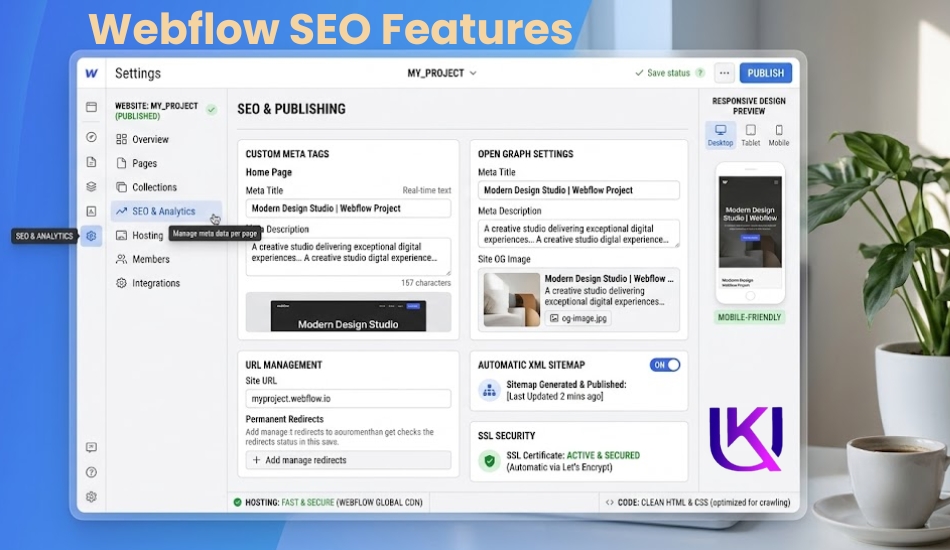
Webflow has become a popular choice for designers, startups, and businesses that want a modern website without relying on many plugins. It combines a visual website builder with built-in hosting and SEO features, making it easier to launch a fast, professional website.
From an SEO point of view, Webflow gives you many important tools right out of the box. You can edit meta titles, meta descriptions, URL slugs, image alt text, redirects, and XML sitemaps without installing extra software. It also creates clean HTML, CSS, and JavaScript, which helps search engines crawl your website more easily.
While Webflow offers strong SEO features, it has fewer customization options than WordPress. As your SEO strategy becomes more advanced, you may notice some limits.
1. Strengths of SEO Strategy with Webflow
Webflow includes many SEO features that work well for beginners and experienced users.
Its biggest strengths include:
- Built-in SEO tools: Edit meta titles, meta descriptions, URL slugs, canonical tags, image alt text, and Open Graph settings from the dashboard.
- Fast website performance: Webflow uses high-quality hosting and a global CDN to help pages load quickly.
- Clean code output: The platform generates clean HTML that makes crawling and indexing easier for search engines.
- Mobile-responsive design: Every website can be optimized for desktops, tablets, and smartphones.
- Automatic XML sitemap: Webflow creates and updates your sitemap automatically.
- Easy 301 redirects: Redirect old URLs without using plugins.
- Secure hosting: Every site includes an SSL certificate and HTTPS by default.
- Visual design editor: Build custom layouts without writing large amounts of code.
These features make Webflow a strong option for businesses that want a fast website with built-in SEO capabilities.
2. Weaknesses with SEO Webflow
Although Webflow performs well for SEO, it is not as flexible as WordPress.
Some limitations include:
- Fewer SEO tools compared to the large WordPress plugin ecosystem.
- Advanced schema markup often requires custom code.
- CMS collections have limits based on your pricing plan.
- Ecommerce features are less mature than WooCommerce.
- Moving your website to another platform can be more difficult.
- Fewer third-party integrations for advanced SEO workflows.
For many small and medium-sized websites, these limits may never become a problem. However, growing businesses with complex SEO needs may eventually need more flexibility.
3. Best Use Cases with Webflow Professional Platform
Webflow is a great fit if you want a professional website with strong built-in SEO and minimal maintenance.
It works especially well for:
- Startup websites
- SaaS companies
- Marketing websites
- Creative agencies
- Design portfolios
- Freelancers
- Small business websites
- Landing pages
- Company websites with moderate content
If you want a website that is easy to manage, loads quickly, and includes essential SEO tools without installing plugins, Webflow is an excellent choice.
However, if you expect your website to grow into a large content hub, ecommerce store, or highly customized SEO project, WordPress offers more flexibility for long-term growth.
Squarespace SEO Overview: Is Squarespace Good Enough for SEO in 2026?
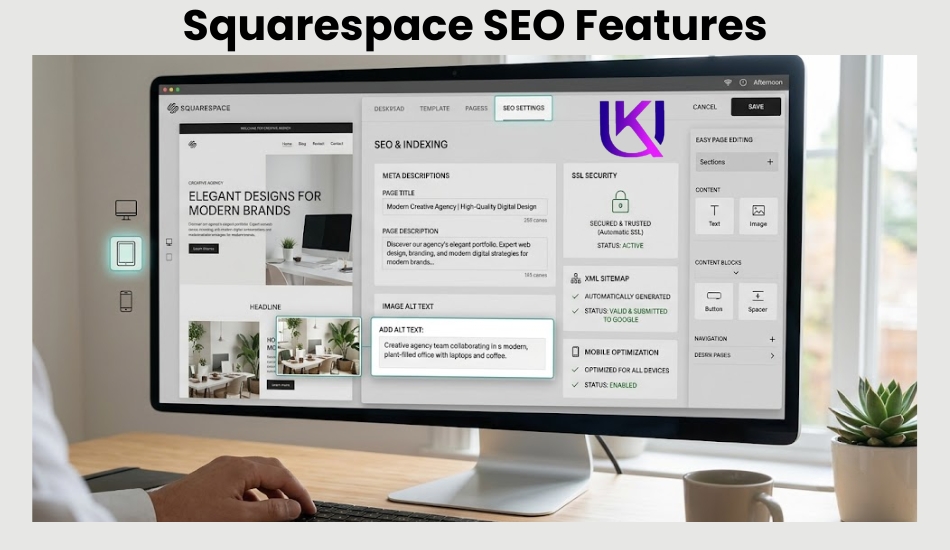
Squarespace is built for people who want to launch a website quickly without learning web development. It offers beautiful templates, built-in hosting, and simple SEO settings in one place.
For beginners, Squarespace makes many SEO tasks easy. You can edit page titles, meta descriptions, image alt text, and URLs. It also creates an XML sitemap, uses HTTPS by default, and generates responsive pages that work well on mobile devices.
However, if your goal is long-term SEO growth, you may find Squarespace less flexible than WordPress or Webflow. It works well for smaller websites, but advanced SEO customization is more limited.
1. Strengths with Squarespace SEO Strategy
Squarespace includes several SEO features that help new website owners get started.
Its main strengths include:
- Easy to use: Build and manage your website without coding.
- Built-in SEO settings: Edit meta titles, meta descriptions, URL slugs, and image alt text from the dashboard.
- Mobile-friendly templates: Every template is designed to work well on phones and tablets.
- Automatic XML sitemap: Search engines can discover your pages more easily.
- Secure hosting: SSL certificates and HTTPS are included with every website.
- Fast setup: Launch a professional website in a short time.
- Clean design templates: Create an attractive website without hiring a designer.
- Minimal maintenance: Hosting, updates, and security are managed for you.
These features make Squarespace a good option for users who want a simple website with basic SEO tools.
2. Weaknesses with Squarespace Builders
Squarespace is easy to use, but that simplicity comes with some trade-offs.
Some common limitations include:
- Less control over advanced technical SEO settings.
- Fewer options for adding custom schema markup.
- No large plugin marketplace like WordPress.
- Limited flexibility for custom features and integrations.
- Less control over website structure as your site grows.
- Ecommerce SEO tools are more limited than WooCommerce.
- Advanced SEO workflows may require custom code or workarounds.
These limits may not matter for a small website. But they can become a challenge if you plan to publish hundreds of pages or build a complex online business.
3. Best Use Cases with Squarespace Beginner Friendly
Squarespace is a solid choice if your website is small, easy to manage, and does not require advanced SEO customization.
It works well for:
- Personal websites
- Portfolio websites
- Photographers
- Artists and designers
- Restaurants
- Local businesses
- Consultants
- Coaches
- Small service businesses
- Event websites
If your main goal is to create a clean, professional website with basic SEO features, Squarespace can do the job well. But if you want maximum SEO control, advanced optimization, or room to scale over the next several years, WordPress and Webflow offer more flexibility.
Key takeaway:
Squarespace is beginner-friendly and includes the SEO essentials. However, businesses that depend on organic traffic, publish content regularly, or need advanced technical SEO will often benefit more from WordPress or Webflow.
WordPress vs Webflow vs Squarespace SEO: Feature-by-Feature SEO Comparison
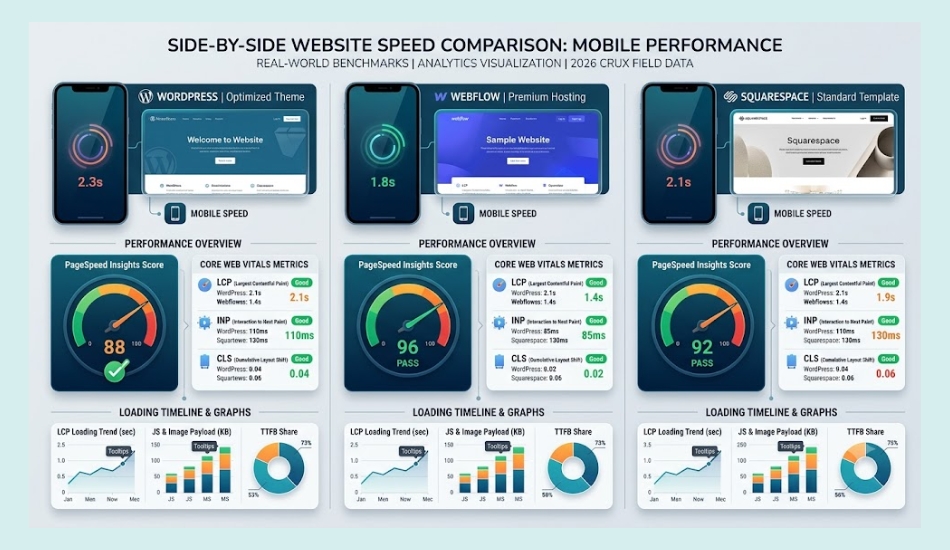
All three platforms can help your website rank on Google. The difference is how much SEO control you get. If you only need the basics, any of them can work. But if you want to improve rankings over time, fix technical SEO issues, and grow your website, the platform you choose matters.
The SEO Comparison Every Business Owner Should Read Before Building a Website. The table below compares the most important SEO features side by side.
| SEO Feature | WordPress | Webflow | Squarespace |
| Overall SEO Score | ⭐⭐⭐⭐⭐ | ⭐⭐⭐⭐☆ | ⭐⭐⭐☆☆ |
| Beginner Friendly | ⭐⭐⭐⭐☆ | ⭐⭐⭐⭐☆ | ⭐⭐⭐⭐⭐ |
| Meta Titles & Descriptions | Full control | Full control | Basic control |
| Custom URL Structure | Full control | Full control | Limited flexibility |
| XML Sitemap | Automatic (via core or SEO plugins) | Automatic | Automatic |
| Robots.txt Control | Full control | Limited customization | Very limited |
| Schema Markup | Easy with Rank Math or Yoast SEO | Often requires custom code | Basic support only |
| Canonical Tags | Full control | Supported | Automatic with limited customization |
| 301 Redirects | Easy with plugins or server settings | Built in | Built in |
| Image SEO | Full control over alt text, compression, lazy loading, and WebP | Alt text and optimization | Alt text with fewer optimization options |
| Internal Linking | Excellent | Good | Good |
| Breadcrumbs | Easy with SEO plugins | Custom setup | Limited |
| SEO Plugins | Thousands available | Not supported | Not supported |
| Page Speed Optimization | Excellent with proper hosting and caching | Excellent | Good |
| Core Web Vitals | High potential | High potential | Good, but less customizable |
| Mobile-Friendly Design | Depends on theme | Built in | Built in |
| Hosting Choice | Choose any hosting provider | Webflow hosting only | Squarespace hosting only |
| CDN Support | Available through hosting or CDN services | Built in | Built in |
| Security (HTTPS/SSL) | Supported | Included | Included |
| WooCommerce / Ecommerce SEO | Excellent | Good | Basic |
| Scalability | Excellent | Very Good | Good |
| Customization | Unlimited | High | Limited |
| Long-Term SEO Growth | Best | Very Good | Good |
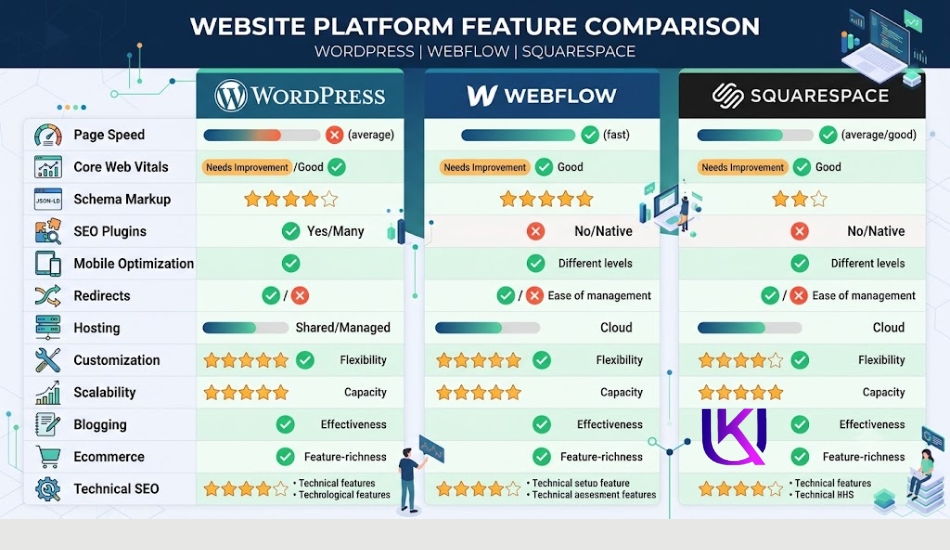
What This Comparison Means: The Best SEO Strategy Begins With the Right Website Builder.
Here is the simple takeaway:
- WordPress gives you the most SEO control. It is the best choice if you plan to grow your website, publish lots of content, improve technical SEO, or run an online store.
- Webflow offers excellent built-in SEO tools and fast performance. It is a great option for business websites, startups, and marketing sites that want less maintenance.
- Squarespace is the easiest platform to use, but it offers fewer advanced SEO features. It works best for small websites that do not need complex optimization.
If SEO is one of your top business goals, WordPress remains the strongest long-term choice because it gives you complete control over your website, content, and technical SEO without limiting future growth.
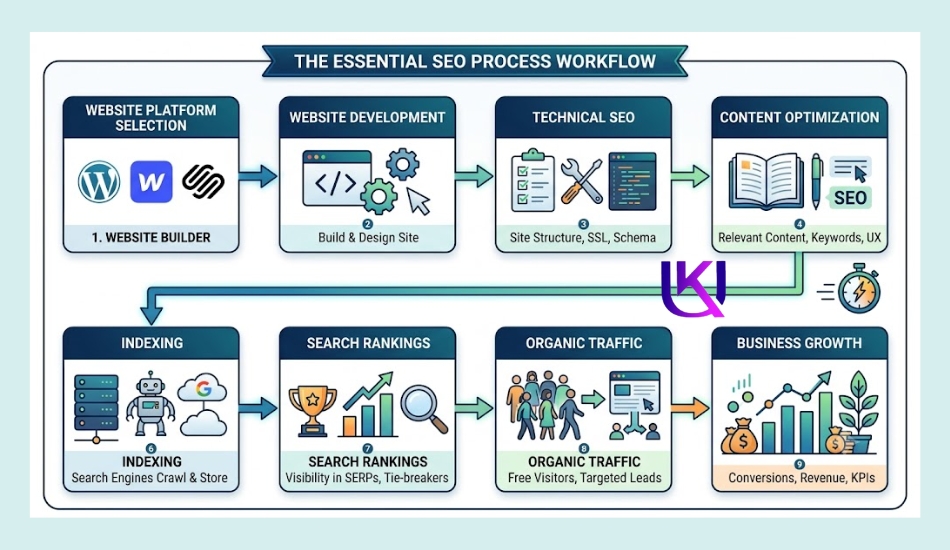
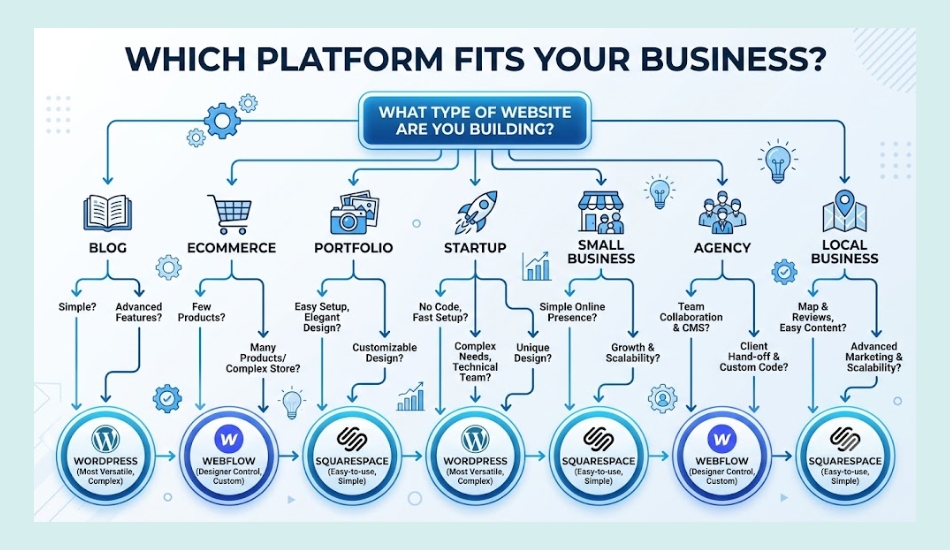
Which Platform Is Best for Different Types of Websites?
The best website platform depends on your goals. A photographer does not need the same features as an online store. A local business has different SEO needs than a blogger.
Use the guide below to find the platform that fits your website and your long-term plans.
| Website Type | Best Choice | Why It Wins |
| Small Business Website | WordPress | Flexible, SEO-friendly, and easy to grow as your business expands. |
| Local Business | WordPress | Works well with local SEO, Google Business Profile, schema markup, and service pages. |
| Personal Blog | WordPress | Best content management, strong SEO plugins, and unlimited publishing options. |
| Professional Blog | WordPress | Built for large content websites and long-term organic traffic. |
| Ecommerce Store | WordPress + WooCommerce | Full control over product pages, categories, technical SEO, and scalability. |
| Startup Website | Webflow | Fast launch, modern design, and built-in SEO tools with little maintenance. |
| SaaS Website | Webflow | Great for landing pages, marketing websites, and product updates. |
| Agency Website | Webflow or WordPress | Webflow for design-focused agencies, WordPress for content-heavy websites. |
| Portfolio Website | Squarespace or Webflow | Beautiful templates and simple setup for showcasing work. |
| Photographer Website | Squarespace | Attractive galleries and easy website management. |
| Restaurant Website | Squarespace | Simple menus, booking pages, and basic SEO features. |
| Large Content Website | WordPress | Handles thousands of pages with strong SEO and content management tools. |
1. If You Want the Best SEO
If your main goal is to get more visitors from Google, WordPress is still the strongest choice.
It gives you:
- Full control over technical SEO.
- Powerful plugins like Rank Math and Yoast SEO.
- Better support for schema markup and structured data.
- Flexible URL structures.
- Easy redirect management.
- Better optimization for Core Web Vitals.
- Freedom to choose faster hosting.
- Unlimited customization as your website grows.
These advantages make WordPress a smart investment for businesses that depend on organic traffic.
2. If You Want the Easiest Website Builder
If you want to launch a professional website quickly and spend less time on maintenance:
- Choose Webflow if you want modern design, built-in SEO tools, and strong performance.
- Choose Squarespace if you want the simplest setup and only need the basic SEO features.
Both platforms are beginner-friendly, but they offer less flexibility than WordPress as your SEO strategy becomes more advanced.
3. Quick Recommendation: WordPress vs Webflow vs Squarespace SEO? Choose With SEO in Mind.
Choose WordPress if you:
- Want the best long-term SEO.
- Plan to publish blog content regularly.
- Need advanced SEO features.
- Run an ecommerce store.
- Expect your website to grow over time.
Choose Webflow if you:
- Want a fast, modern website.
- Prefer built-in hosting.
- Need strong SEO without installing plugins.
- Focus on design and marketing pages.
Choose Squarespace if you:
- Need a simple website.
- Have a small business or portfolio.
- Want an all-in-one platform.
- Do not need advanced SEO customization.
However, all three platforms can rank in Google Search. The difference is how much control you have. If SEO is a key part of your business strategy, WordPress offers the most flexibility, scalability, and long-term value.
| A Word of Caution: Smart Businesses Build Websites With SEO in Mind. Migrating platforms later is expensive and risky for your rankings. Every migration can lose backlinks, break URLs, and cost you months of traffic while Google re-crawls your new site. Pick the platform that fits where your business is going, not just where it is today. |
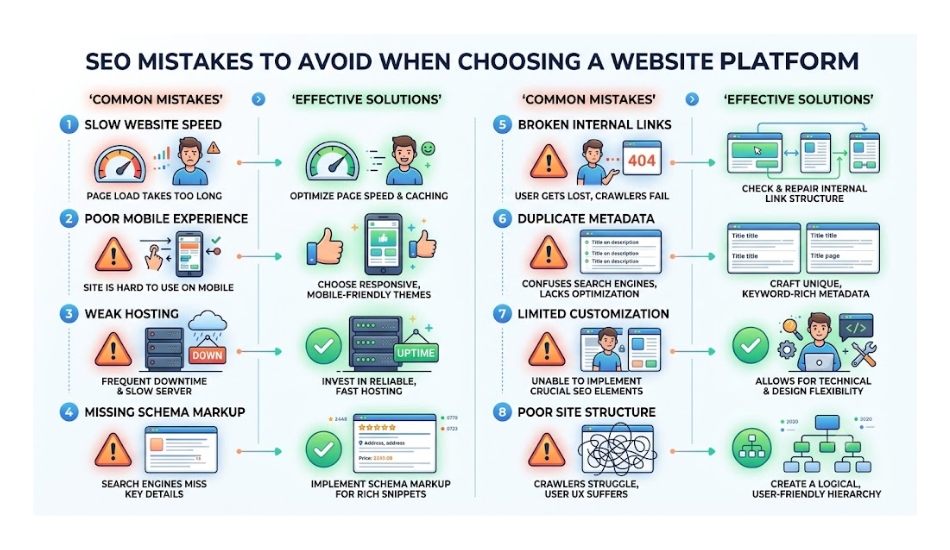
Common SEO Mistakes People Make When Choosing a Website Builder
Many people choose a website platform based on looks or price alone. Later, they discover that changing SEO settings, improving website speed, or adding new features is much harder than expected.
Before you build your website, avoid these common mistakes.
1. Choosing Design Over SEO
A beautiful website does not always rank well on Google.
Some website builders offer stunning templates but limit your control over important SEO settings like schema markup, URL structure, redirects, and technical optimization.
What to do instead: Choose a platform that balances great design with strong SEO features. Your website should look good and perform well in search results.
2. Ignoring Long-Term Growth
Many beginners only think about today’s needs.
But ask yourself:
- Will you add more blog posts?
- Will you launch new services?
- Will you open an online store?
- Will you target more cities or states?
- Will your website grow to hundreds of pages?
If the answer is yes, choose a platform that can grow with your business. Migrating to another platform later can take time, cost money, and affect your search rankings.
3. Thinking the Platform Does All the SEO Work
No website platform can rank your pages by itself. If you use WordPress, Webflow, or Squarespace, Google still looks for:
- Helpful, original content
- Fast page speed
- Mobile-friendly pages
- Strong internal linking
- Good user experience
- Quality backlinks
- Clear website structure
- Technical SEO best practices
Your platform provides the tools, but your SEO strategy determines the results.
4. Choosing Cheap Hosting Instead of Quality Performance
This mainly affects WordPress users.
A low-cost hosting plan can lead to:
- Slow page loading
- Poor Core Web Vitals
- Frequent downtime
- Security problems
- Lower user satisfaction
Investing in reliable hosting helps improve speed, security, and overall website performance, which supports better SEO over time.
5. Forgetting Website Maintenance
Every website needs regular care.
For example:
- Update plugins and themes.
- Fix broken links.
- Optimize images.
- Refresh outdated content.
- Monitor Google Search Console.
- Check Core Web Vitals.
- Improve page speed as your site grows.
A well-maintained website is easier for Google to crawl and provides a better experience for your visitors.
Key Takeaway: WordPress vs Webflow vs Squarespace SEO
The best website builder is not always the one with the most features or the lowest price. It is the one that matches your goals, supports your SEO strategy, and gives your website room to grow.
Choosing the right platform from the beginning can save you time, reduce future costs, and make it easier to improve your rankings as your business expands.
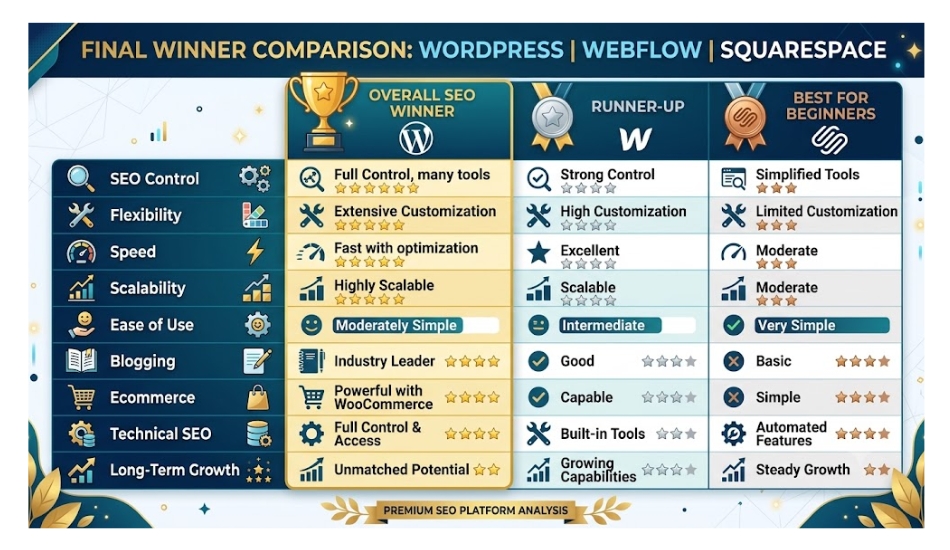
Final Comparison: Smart Businesses Build Websites With SEO in Mind.
| If Your Goal Is… | Best Platform |
| Best overall SEO | WordPress |
| Most SEO control | WordPress |
| Easy website management | Squarespace |
| Modern design with built-in SEO | Webflow |
| Blogging | WordPress |
| Ecommerce | WordPress + WooCommerce |
| Startup website | Webflow |
| Portfolio website | Squarespace |
| Local business website | WordPress |
| Long-term website growth | WordPress |
Our Recommendation: Choose Your Platform. Shape Your Rankings.
If you are serious about growing your business through Google Search, WordPress is the best long-term investment. It gives you the flexibility to improve every part of your SEO strategy, from content and site speed to schema markup and technical optimization.
If you are looking for a website that is built around performance, search visibility, and future growth, choosing the right platform is only the first step. A well-planned WordPress website, combined with proper technical SEO, content optimization, and ongoing maintenance, can help you attract more qualified visitors and turn them into customers.
Need a professional WordPress website built for SEO?
A properly developed WordPress site can be faster, easier to manage, and better prepared for higher Google rankings from day one. If you’re starting a new website or upgrading an existing one, investing in SEO-friendly WordPress development gives your business a stronger foundation for long-term success.
Helpful article: SEO Services Guide: How to Choose the Right SEO Service for Your Business?
Conclusion: WordPress vs Webflow vs Squarespace SEO: Which Platform Really Wins for SEO?
Choosing the right website platform is one of the most important decisions you can make for your online success. While WordPress, Webflow, and Squarespace all support SEO, they are built for different types of users and business goals.
If your priority is long-term organic traffic, complete SEO control, and room to grow, WordPress is the clear winner. It gives you full access to technical SEO settings, powerful plugins like Rank Math and Yoast SEO, flexible hosting options, and unlimited customization. If you run a blog, a local business, or an ecommerce store, WordPress provides a strong foundation for sustainable search rankings.
Webflow comes in second. It offers excellent built-in SEO features, fast hosting, and a visual editor that is easy to use. It is a great choice for startups, agencies, SaaS companies, and businesses that want a modern website with less maintenance.
Squarespace is the easiest platform for beginners. It includes SEO basics and beautiful templates, making it a good fit for portfolios, restaurants, consultants, and small business websites. However, it offers less flexibility for advanced SEO and future growth.
Helpful article: How to Choose a WordPress Developer in the United States?

FAQs: WordPress vs Webflow vs Squarespace SEO: Can a Website Platform Help or Hurt Your SEO?
1. Is WordPress really better than Webflow for SEO?
Yes, for most businesses and small sites, both can rank well. WordPress pulls ahead once your site grows past a thousand pages or needs custom features a plugin can add. Webflow pulls ahead when you want fast pages without managing hosting yourself.
WordPress offers more SEO flexibility than Webflow. You can use powerful SEO plugins like Rank Math or Yoast SEO, choose your own hosting, improve Core Web Vitals, and customize technical SEO settings.
Webflow also has strong SEO features, but it provides fewer customization options for advanced SEO strategies.
2. Which platform is fastest for SEO?
Webflow tends to load fastest right out of the box, since it does not rely on extra plugins. A well-hosted WordPress site with a lean theme can match that speed.
3. Can Webflow rank as well as WordPress on Google?
Yes. A well-built Webflow website can rank very well on Google. It creates clean code, loads quickly, and includes built-in SEO tools. However, WordPress gives you more control over technical SEO and is often the better choice for large websites or businesses that want to scale their SEO over time.
4. Is Squarespace good for SEO?
Yes, Squarespace is good for basic SEO. It includes features like custom meta titles, meta descriptions, XML sitemaps, SSL, and mobile-friendly templates. It works well for small business websites, portfolios, and personal sites. For advanced SEO, WordPress and Webflow offer more flexibility.
5. Does Squarespace hurt my SEO?
No, not for a small site. Squarespace covers the basics well. It only becomes a limit once you need advanced technical SEO, like custom schema or direct robots.txt control.
6. Which platform is best for beginners?
If you want the easiest platform to learn, Squarespace is the best option. Its simple dashboard and all-in-one setup make it easy to launch a website. If you want more SEO control while still keeping things beginner-friendly, WordPress is a better long-term choice.
7. Which platform is best for a small business website?
For most small businesses, WordPress is the best choice. It supports local SEO, blogging, service pages, and future growth. If your website is small and you prefer a simple setup, Squarespace or Webflow can also be good options.
8. Can I switch platforms later without losing my rankings?
You can, but it takes careful planning. You need to keep your URLs, redirect old pages correctly, and rebuild your content structure. Done poorly, a migration can cost you months of traffic.
9. Which platform is better for blogging?
WordPress is the best platform for blogging. It was built as a content management system and offers advanced publishing tools, categories, tags, internal linking, and SEO plugins that help your blog grow in Google Search.
10. Which platform is better for ecommerce SEO?
If SEO is important for your online store, WordPress with WooCommerce is the strongest option. It gives you full control over product pages, category pages, schema markup, URLs, and technical SEO. Webflow Ecommerce works well for smaller stores, while Squarespace is best for simple online shops.
11. Does the website platform affect Google rankings?
Not directly. Google does not rank a website higher just because it uses WordPress, Webflow, or Squarespace. Rankings depend on factors like helpful content, page speed, mobile usability, Core Web Vitals, backlinks, and technical SEO. However, the right platform makes it easier to optimize these ranking factors.
12. Do I need a developer to get good SEO on any of these platforms?
Not always. Squarespace and Webflow are built for non-developers. WordPress can also be simple with the right theme, but a developer helps when you want full control over speed and structure.
13. Can I switch from Squarespace or Webflow to WordPress later?
Yes, you can migrate your website to WordPress. However, moving pages, images, blog posts, and URLs takes planning. If redirects and SEO settings are not handled correctly, you may lose rankings and traffic. Starting with the right platform can save time and reduce migration costs.
14. Which website platform wins for SEO in 2026?
For most businesses, WordPress remains the best website platform for SEO in 2026. It offers the highest level of customization, supports advanced technical SEO, works with leading SEO plugins, and scales easily as your website grows. Webflow is an excellent choice for modern marketing websites, while Squarespace is best for users who want a simple, easy-to-manage website with basic SEO features.